Compensation Planning

Run your compensation cycle without the spreadsheets

CompBldr Compensation Planner gives HR and Finance a single governed system to plan, approve, and execute merit increases, bonuses, and incentives across every department.

Employee performance review interface
The Financial and Human Cost of Unstructured Compensation Planning

58%

of organizations still manage compensation planning in spreadsheets, creating version control failures, audit gaps, and budget overruns each cycle.

3.1×

more likely to close the merit cycle on time when organizations use a structured compensation planning system vs. spreadsheet-based planning.

72%

of HR leaders say pay compressionis their top compensation challenge. Most discover it after the cycle closes, when it is too late to act.

One System for Every Compensation Decision

From merit cycles and bonus planning to performance-linked pay and total rewards communication, CompBldr Compensation Planner replaces disconnected spreadsheets with a governed workflow that Finance and HR both trust.

Structured Merit Cycles

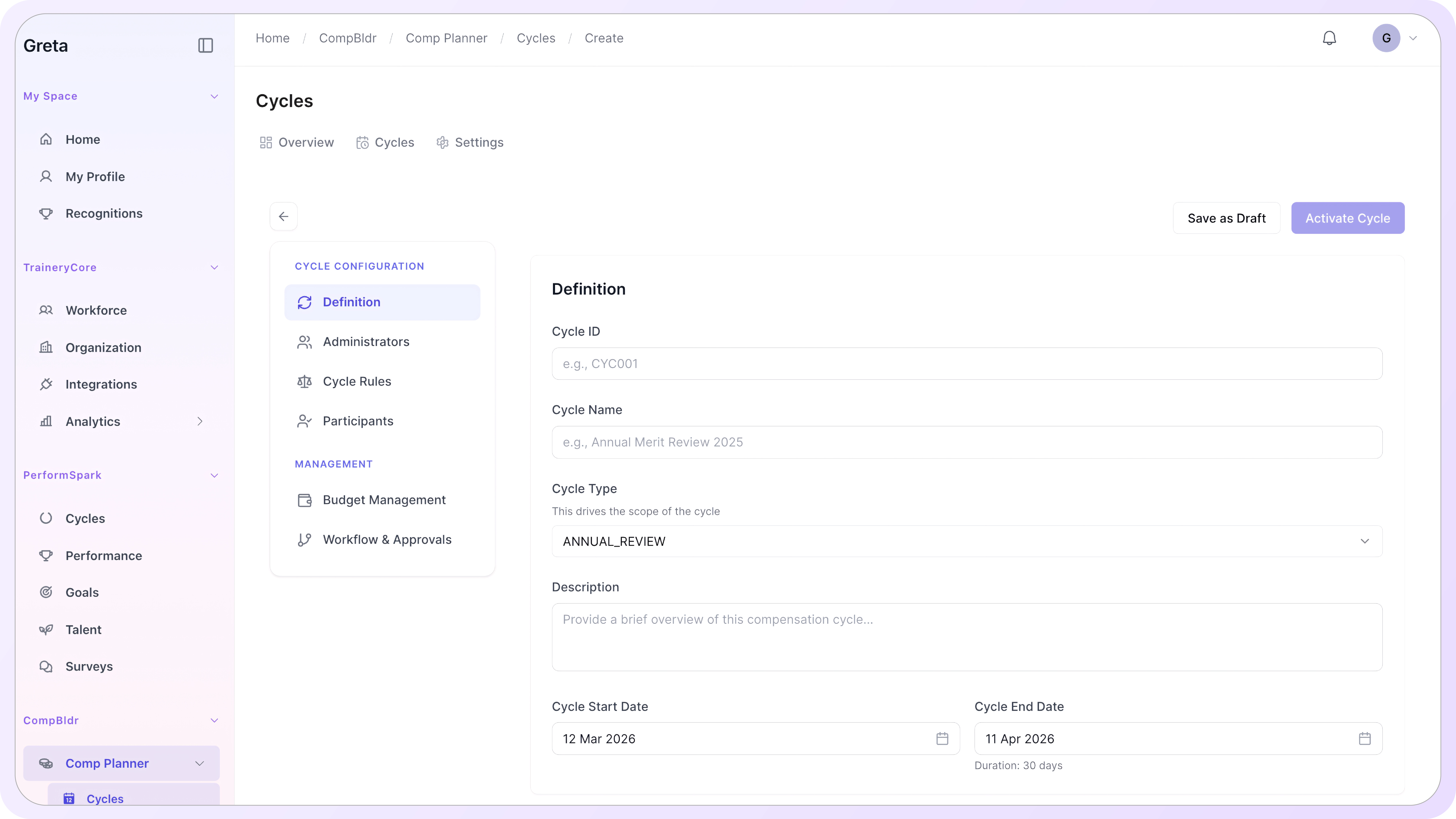
Build and manage your full merit cycle inside one platform. Set eligibility rules, configure the merit matrix, assign budgets, and route approvals without switching tools.

Governed Budget Control

Allocate budgets top-down or bottom-up. Finance sees real-time budget consumption as managers submit proposals. Overspend is flagged before approvals finalize.

Pay for Performance Alignment

Link merit eligibility and increase ranges directly to performance ratings. High performers receive differentiated outcomes. Every exception is documented.

Audit-Ready Approval Trails

Every proposal, approval, and override is logged with the reviewer, timestamp, and rationale. Pay equity audit packages are produced on demand, not rebuilt under deadline pressure.

How CompBldr Compensation Planner Works

CompBldr's Compensation Planner gives HR and Finance a single system to run the entire compensation cycle, from building the cycle and allocating budgets to manager proposals, approvals, and employee reward statements.

Build the Cycle, Not the Spreadsheet.

Set up your entire merit cycle inside CompBldr: eligibility rules, effective dates, merit matrix guidelines, and manager access controls. Every step runs inside the system, so nothing gets lost between email threads and file versions.

Configure eligibility by employment type, tenure, performance rating, or department.
Set merit increase ranges by grade level and performance band.
Publish the cycle to managers with one action, with deadlines and reminders built in.
Lock and submit completed proposals through a structured approval chain.

Set the Budget. Track Every Dollar in Real Time.

Define compensation budgets at the organization, division, or department level. As managers submit proposals, budget consumption updates in real time. Finance and HR work from the same number.
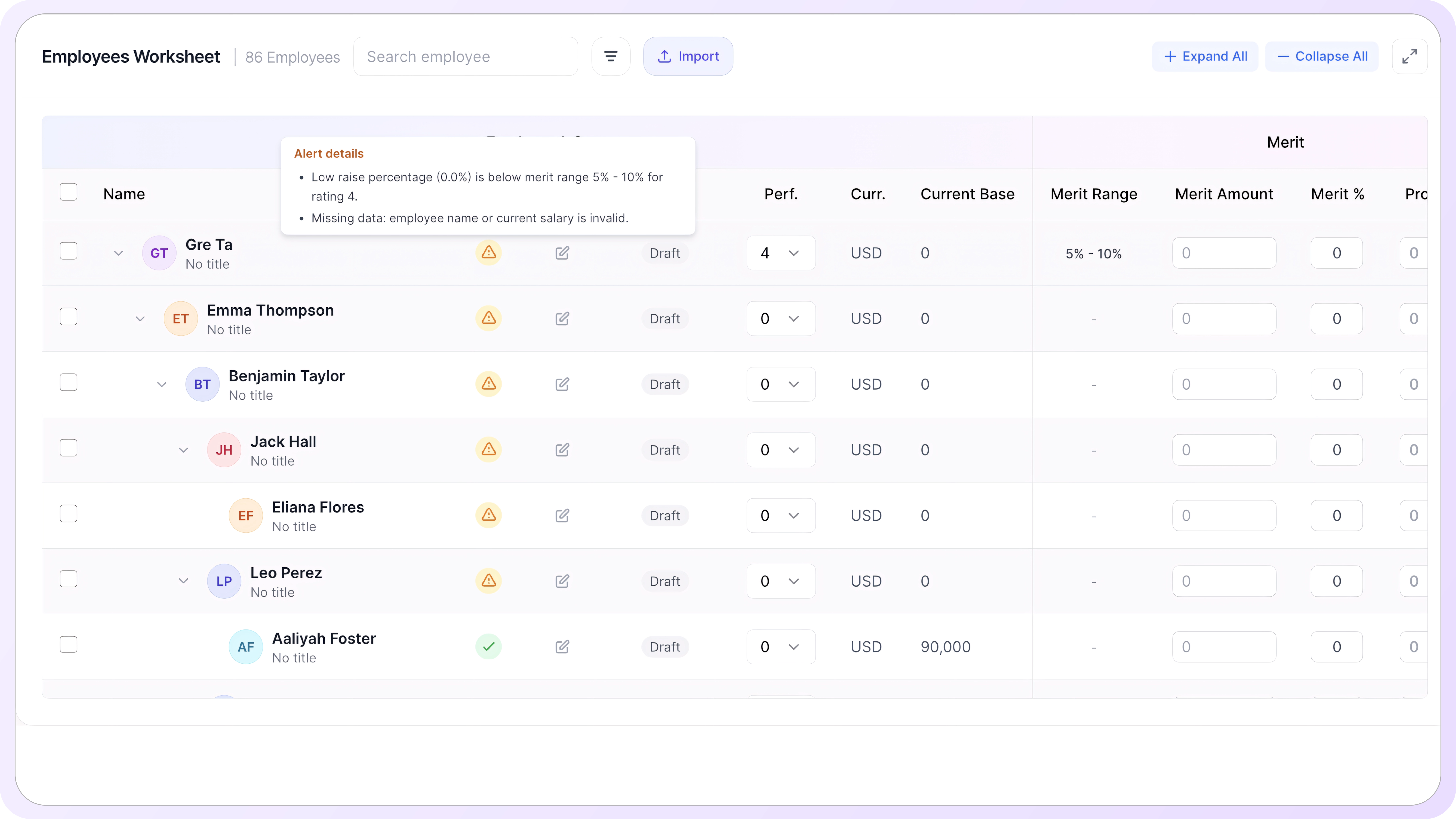
Allocate budgets top-down from a total pool or bottom-up by department.
View live budget consumption as proposals are submitted and approved.
Flag proposals that exceed the allocated budget before they reach final approval.
Export budget summary reports for Finance review at any point in the cycle.

Top-Down, Bottom-Up, or Both.

CompBldr supports the planning methodology that fits your organization. Run a centrally allocated top-down cycle, empower managers to propose from the bottom up, or combine both approaches for different populations.

Top-down: HR allocates a fixed budget per department; managers work within it.
Bottom-up: managers propose increases for their team within the merit matrix; HR reviews in aggregate.
Hybrid: configure different approaches by employee group, region, or division.
Switch methodology between cycles without rebuilding the configuration from scratch.

Multi-Level Approvals That Route Themselves.

Configure multi-level approval workflows that route proposals automatically based on increase amount, department, or employee grade. No manual forwarding. No approvals stuck in someone's inbox.

Define approval chains by role, department, increase threshold, or a combination.
Automatic routing to the next approver when the current stage is completed.
Escalation alerts when proposals sit past the configured deadline.
Full approval history logged per proposal: reviewer, decision, timestamp, and any override rationale.

Link Pay to Performance, Automatically.

Import performance ratings directly from your performance management system or enter them within CompBldr. Merit eligibility and increase ranges are applied automatically based on the rating band and grade level you configure.

Sync performance ratings from your existing performance management platform via API.
Apply merit matrix guidelines automatically: rating band determines the increase range.
Flag high performers receiving below-guideline increases for HR review.
Document every exception with a required rationale before the proposal moves forward.

Every Employee Sees Their Compensation Story

When the cycle closes, CompBldr generates personalized total rewards statements for every employee. Base salary, bonus, and benefits are presented in plain language, so employees understand the full value of what they receive, not just their paycheck.

Auto-generate total rewards statements when the cycle closes.
Include base salary, bonus, benefits, and employer contributions in a single view.
AI-assisted plain-language narrative explains compensation positioning and context.
Governed distribution: HR controls when statements are released and to whom.

What a Governed Compensation Cycle
Actually Delivers.

These are the outcomes CompBldr customers see when they replace spreadsheet-based planning with a structured, governed compensation system.

Cycles Close on Time

Structured workflows, automated reminders, and approval routing mean the cycle runs itself. No chasing managers at the deadline.

Budget Stays on Plan

Top-down budget controls prevent overspend at every level. Finance sees the same numbers HR uses, updated in real time.

Pay Compression Caught Early

Compression flags surface before approvals finalize. Analysts fix equity issues during the cycle, not after employees notice.

Manager Bias Reduced

Merit matrix guardrails constrain discretionary increases. Every proposal outside the guideline requires a documented rationale.

Pay and Performance Aligned

Performance ratings link directly to merit eligibility and increase ranges. High performers receive differentiated outcomes, not averaged ones.

Audit Trail Built In

Every proposal, approval, and override is logged with the reviewer, timestamp, and stated reason. Pay equity audit packages are produced on demand.

CompBldr Compensation Planner vs. Spreadsheet-Based Planning

Spreadsheets were never built for compensation planning. They have no approval routing, no real-time budget visibility, no compression detection, and no audit trail. Here is what that gap costs at cycle time, and what a governed compensation planning system delivers instead.

Capability
Spreadsheet-Based Planning
CompBldr Compensation Planner
Cycle setup
HR builds the merit matrix, eligibility rules, and budget allocation in separate spreadsheets. Setup takes days. One formula error cascades across every manager's file
Eligibility rules, merit matrix, budget allocation, and manager access are configured once inside the platform. The cycle is published to all managers in one action.
Budget visibility
Finance and HR work from different versions of the budget file. By the time proposals are consolidated, the numbers no longer match. Reconciliation happens after the cycle closes.
Finance and HR see the same budget in real time. As managers submit proposals, budget consumption updates live. Overspend is flagged before approvals finalize, not after.
Approval routing
Managers email completed files to their HRBP. HR consolidates, checks for errors, and escalates exceptions manually. Approvals live in inboxes, not a system.
Proposals route through a configured multi-level approval chain automatically. Escalation alerts fire when approvals sit past their deadline. Every decision is logged with reviewer and timestamp.
Pay compression detection
Compression analysis runs after the cycle closes, if it runs at all. By then, approved increases have already created the problem, and reversing them is politically difficult.
Compression flags surface in real time as proposals are submitted. Analysts see compression risk during the cycle and resolve it before approvals finalize.
Performance linkage
Performance ratings live in the performance management system. Copying them into the compensation spreadsheet is manual, error-prone, and done differently by every manager.
Performance ratings sync from the performance management system via API. Merit eligibility and increase ranges apply automatically based on rating band and grade. No manual copy-paste.
Manager access and controls
Managers receive a shared Excel file with no guardrails. Any cell can be edited. Budget overruns and guideline exceptions go undetected until HR reviews the consolidated file.
Managers work within their allocated budget. The merit matrix constrains discretionary increases. Proposals outside the guideline require a documented rationale before they advance.
Audit trail
The audit trail is a folder of emailed spreadsheets. Reconstructing who approved what, when, and why requires searching through email history and comparing file versions.
Every proposal, approval, rejection, and override is logged with reviewer identity, timestamp, and rationale. A pay equity audit package is produced on demand.
Total rewards communication
Statements are produced manually at cycle end, if at all. Most employees receive a salary increase notification with no context about total compensation value.
CompBldr generates personalized total rewards statements when the cycle closes. Base salary, bonus, benefits, and employer contributions are presented in plain language with an AI-assisted narrative.
Cycle setup
Spreadsheet-Based Planning
HR builds the merit matrix, eligibility rules, and budget allocation in separate spreadsheets. Setup takes days. One formula error cascades across every manager's file.
CompBldr Compensation Planner
Eligibility rules, merit matrix, budget allocation, and manager access are configured once inside the platform. The cycle is published to all managers in one action.
Budget visibility
Spreadsheet-Based Planning
Finance and HR work from different versions of the budget file. By the time proposals are consolidated, the numbers no longer match. Reconciliation happens after the cycle closes.
CompBldr Compensation Planner
Finance and HR see the same budget in real time. As managers submit proposals, budget consumption updates live. Overspend is flagged before approvals finalize, not after.
Approval routing
Spreadsheet-Based Planning
Managers email completed files to their HRBP. HR consolidates, checks for errors, and escalates exceptions manually. Approvals live in inboxes, not a system.
CompBldr Compensation Planner
Proposals route through a configured multi-level approval chain automatically. Escalation alerts fire when approvals sit past their deadline. Every decision is logged with reviewer and timestamp.
Pay compression detection
Spreadsheet-Based Planning
Compression analysis runs after the cycle closes, if it runs at all. By then, approved increases have already created the problem and reversing them is politically difficult.
CompBldr Compensation Planner
Compression flags surface in real time as proposals are submitted. Analysts see compression risk during the cycle and resolve it before approvals finalize.
Performance linkage
Spreadsheet-Based Planning
Performance ratings live in the performance management system. Copying them into the compensation spreadsheet is manual, error-prone, and done differently by every manager.
CompBldr Compensation Planner
Performance ratings sync from the performance management system via API. Merit eligibility and increase ranges apply automatically based on rating band and grade. No manual copy-paste.
Manager access and controls
Spreadsheet-Based Planning
Managers receive a shared Excel file with no guardrails. Any cell can be edited. Budget overruns and guideline exceptions go undetected until HR reviews the consolidated file.
CompBldr Compensation Planner
Managers work within their allocated budget. The merit matrix constrains discretionary increases. Proposals outside the guideline require a documented rationale before they advance.
Audit trail
Spreadsheet-Based Planning
The audit trail is a folder of emailed spreadsheets. Reconstructing who approved what, when, and why requires searching through email history and comparing file versions.
CompBldr Compensation Planner
Every proposal, approval, rejection, and override is logged with reviewer identity, timestamp, and rationale. A pay equity audit package is produced on demand.
Total rewards communication
Spreadsheet-Based Planning
Statements are produced manually at cycle end, if at all. Most employees receive a salary increase notification with no context about total compensation value.
CompBldr Compensation Planner
CompBldr generates personalized total rewards statements on cycle close. Base salary, bonus, benefits, and employer contributions are presented in plain language with an AI-assisted narrative.

Frequently Asked Questions

What types of compensation cycles does CompBldr Compensation Planner support?

CompBldr supports merit increases, promotional adjustments, bonus planning, incentive cycles, and off-cycle adjustments. Each cycle type is configured independently with its own eligibility rules, merit matrix, budget allocation, and approval workflow. Multiple cycle types can run simultaneously for different employee populations.

How does budget allocation work across a large organization?

HR sets a total compensation budget at the organization level. CompBldr distributes it by division, department, or cost center based on your configuration. Managers propose increases within their allocated budget. Finance sees real-time consumption as proposals are submitted, with overspend flagged before final approval.

Can compensation approval workflows differ for different departments or roles?

Yes. Approval chains are configured by department, employee grade, increase threshold, or a combination. A proposal above a certain dollar amount can require additional approval levels automatically. Every configuration is set once and applied consistently across the cycle without manual routing.

How does CompBldr Compensation Planner integrate with our HRIS and payroll system?

CompBldr connects to leading HRIS and payroll platforms via API. Employee data, performance ratings, and grade information sync into the planning cycle automatically. Approved compensation changes are exported in payroll-ready format, reducing manual re-entry and the reconciliation errors that come with it.

How does the audit trail support compensation and legal reviews?

Every proposal, approval, rejection, and override is logged with the reviewer's identity, timestamp, and stated rationale. CompBldr produces a complete audit package on demand, covering the full decision history for every employee in the cycle. This satisfies both internal audit and external pay equity review requirements.

What is pay compression, and how does CompBldr help prevent it?

Pay compression occurs when the pay gap between senior and junior employees in the same job family narrows over time. CompBldr flags compression risk in real time during the merit cycle, surfacing employees whose proposed increases would bring their pay too close to peers at lower grade levels, before approvals finalize.

Can managers see only their own team during the compensation cycle?

Yes. Manager access is scoped to their direct reports only. Managers see the compensation data and merit proposals for their team and cannot view other departments. HR and Finance have configurable broader access based on their role. All access levels are set during implementation.

Compensation Planning That Finance and HR Both Trust.

CompBldr Compensation Planner gives every stakeholder in the pay decision chain exactly what they need: HR gets a governed cycle that runs on time, Finance gets real-time budget visibility, and employees get a clear picture of what they earn and why.