JobBldr

Governed job description management from first draft to final approval.

One platform for authoring, structuring, collaborating on, approving, and version-controlling job descriptions at scale. Every role. Every change. Every approval. Fully documented.

The Hidden Cost of Unstructured Job Documentation

68%

of HR leaders say their job descriptions are inconsistent or out of date across entities

3.2×

higher pay equity audit risk when job architecture is informal or undocumented

$1.4M+

average cost of a single pay equity audit for a mid-to-large enterprise

Everything a Job Description Needs to Be Governed, Consistent, and Audit-Ready

CompBldr provides a structured environment for creating, managing, and governing job descriptions across the organization. From standardized authoring templates to multi-level approval workflows, every step is controlled and traceable.

Structured Authoring at Scale

Build every job description from a reusable master library, shared templates, and governed addendums. No blank pages. No inconsistent language across departments.

Multi-Level Approval Workflows

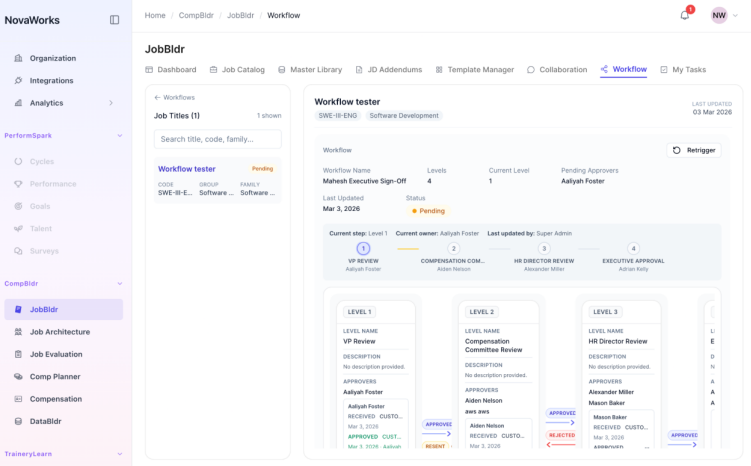
Route every JD through a configured approval chain: Legal, HR Director, VP, and the Compensation Committee. Automated routing, escalation alerts, and a task-driven approver inbox keep every review on track.

Version Control and Comparison

Every draft is versioned. The comparison board shows exactly what changed between any two snapshots. Teams consolidate updates and apply changes without a manual merge.

Audit-Ready Governance Record

Every edit, approval, rejection, and override is logged with the reviewer, timestamp, and rationale. Pay equity audits and compliance reviews draw from a governed record, not a shared drive.

How CompBldr Compensation Planner Works.

CompBldr's Compensation Planner gives HR and Finance a single system to run the entire compensation cycle, from building the cycle and allocating budgets to manager proposals, approvals, and employee reward statements.

Start With Full Visibility Across Every Job Description.

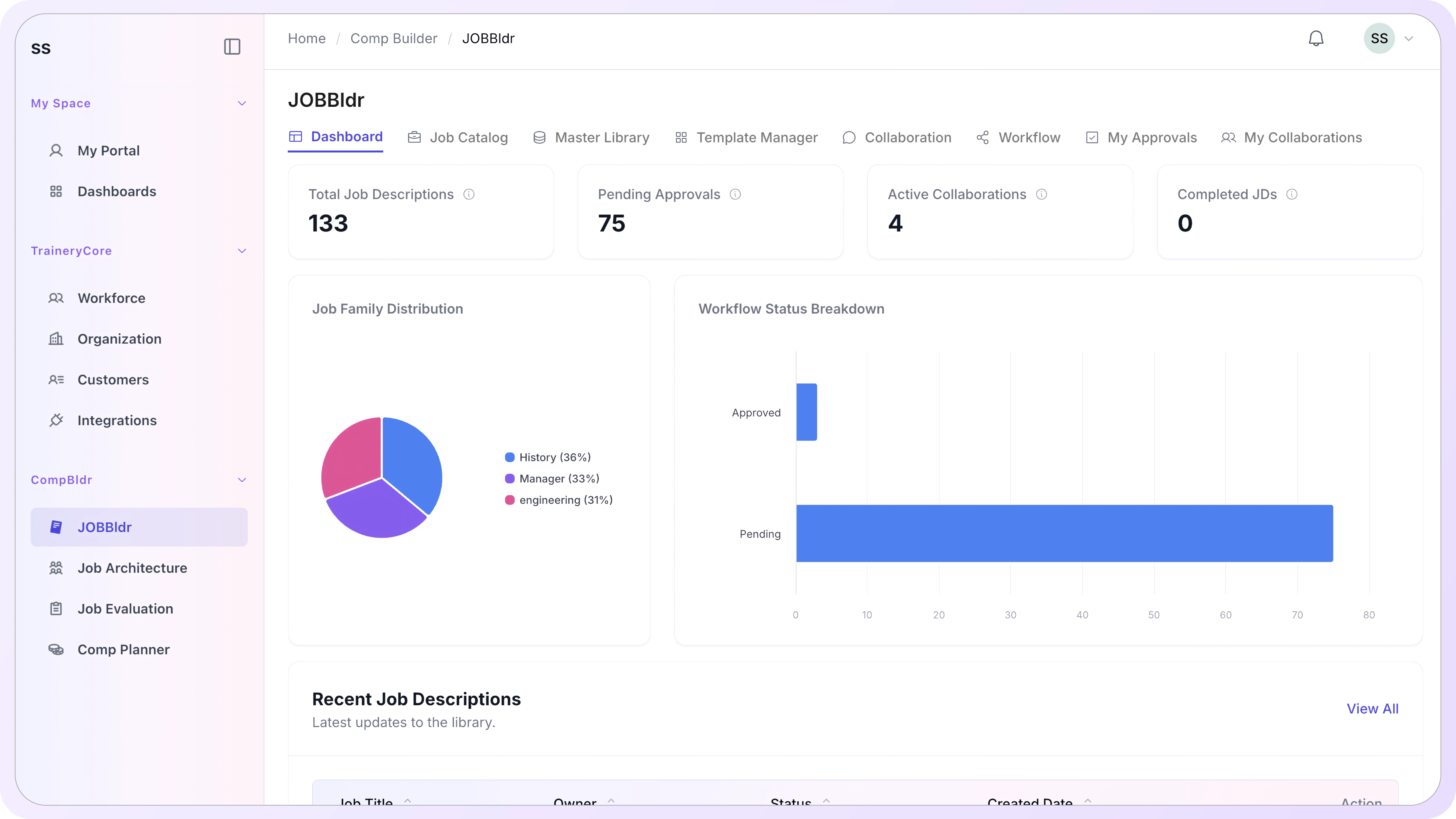
The JobBldr dashboard gives HR, Legal, and Compensation teams a real-time view of everything in motion: total job descriptions in the system, pending approvals, active collaborations, completed outputs, and workflow health. No chasing status updates across email threads.

Total JD count with status breakdown: draft, in progress, approved, and completed
Pending approvals queue: who is waiting, on which title, and at which stage
Active collaborations: external and internal contributors currently assigned
Job family distribution: visual breakdown of role coverage across the organization

Set Up Shared Building Blocks Before You Scale

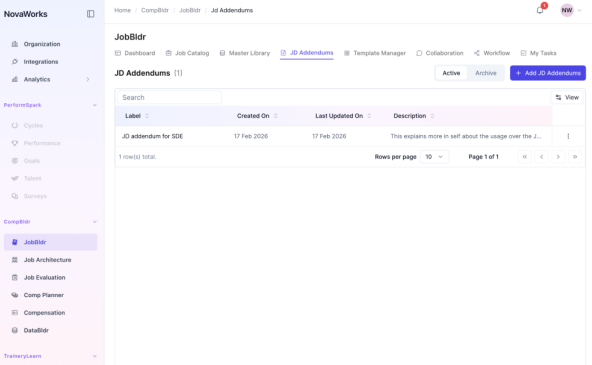
Before teams begin authoring individual job descriptions, JobBldr lets administrators establish the reusable components that keep content consistent across the organization: addendums, templates, approver configurations, and workflow structures.

Add, archive, and manage addendums from a single library view
Attach addendums to individual titles or apply them across a job family
Toggle addendum visibility in the JD preview without removing it from the record

Work From a Master Library, Not a File System

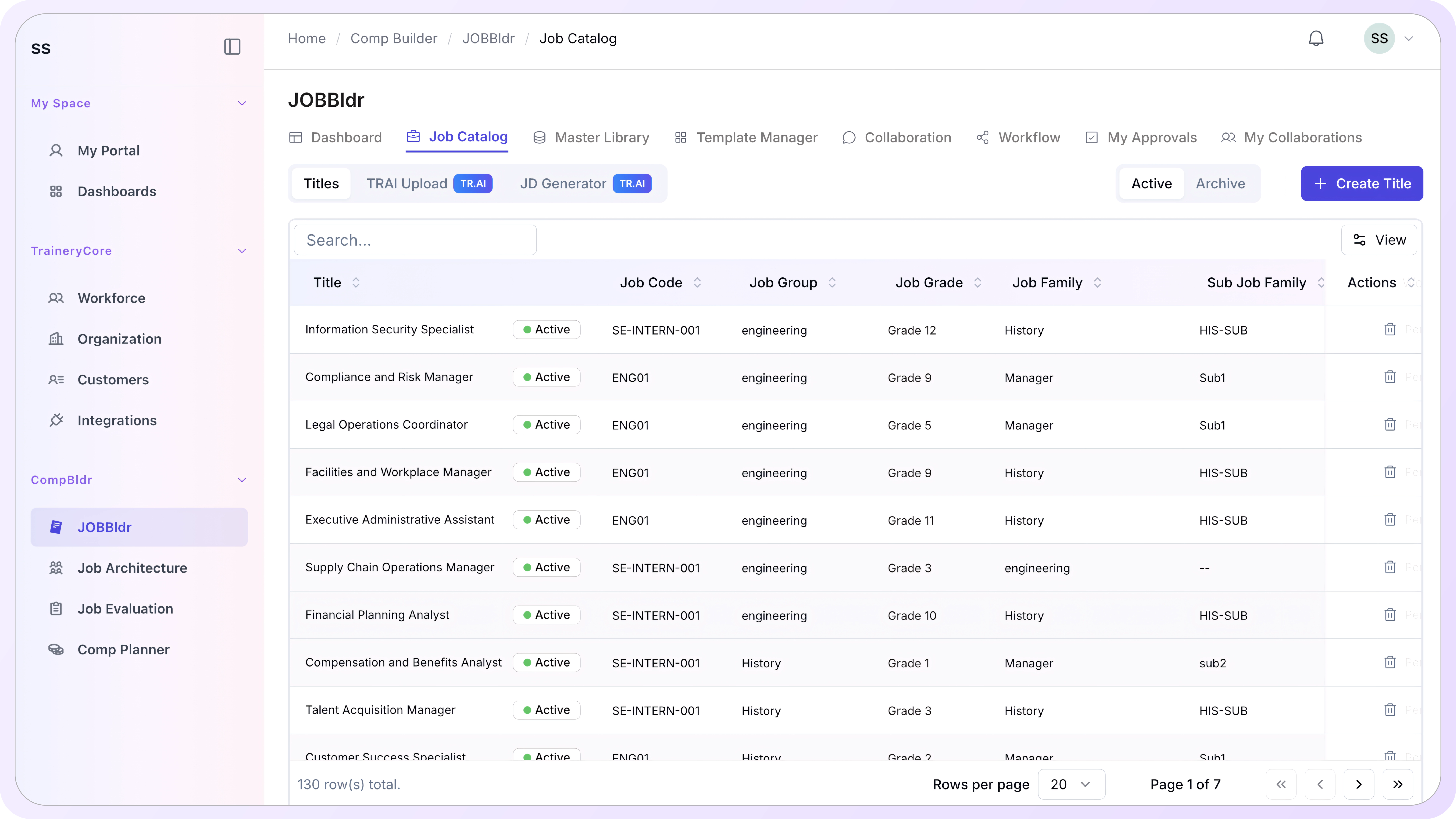
The JobBldr master library is a searchable, centrally governed repository of every active job description in the organization. Each title is linked to its job code, job group, job family, assigned template, activation status, and last updated date. Teams select an existing title or create a new one directly from the library without leaving the platform.

Search by title, code, family, or group across the full library
Filter by status: active, inactive, draft, in progress, or completed
Link each title to its job architecture record, grade level, and compensation data in CompBldr

Author and Structure Every Job Description in a Guided Workspace

Once a title is selected, the JobBldr authoring workspace guides users through every component of the job description: general metadata, sections, duties, addendums, and additional information. The workspace is structured so nothing is missed and nothing is inconsistent.

Manage sections in a drag-to-reorder panel: General, Duties, and Additional Information
Edit job metadata: code, group, grade, family, sub-family, and name of position
Attach or detach addendums per title without affecting the shared addendum library
Save and finalize the draft when ready to move it into the approval workflow

Track Every Change. Compare Any Two Versions. Merge Without Risk

JobBldr versions every save automatically. The version history panel gives teams a side-by-side snapshot view of any prior draft alongside the current working version: sections, duties, metadata, and document content all visible without leaving the editing workspace.
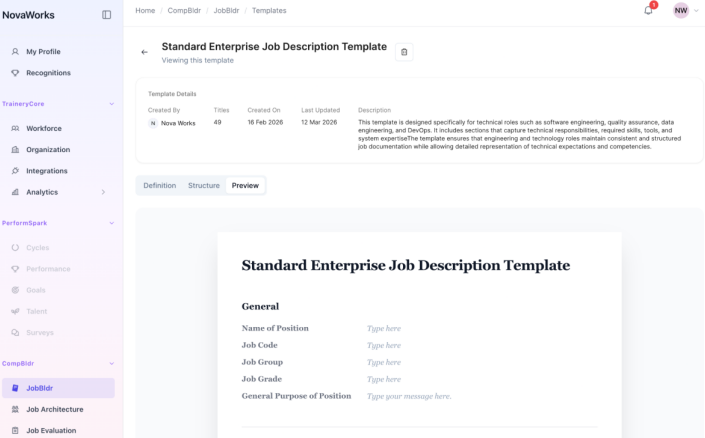
Browse all snapshots with creator, date, and summary metadata
Preview any snapshot in formatted JD output alongside the current draft
Restore a previous version or use it as the base for a new draft

Restore a previous version or use it as the base for a new draft

The JobBldr collaboration workspace lets HR teams assign internal contributors and invite external participants to specific job titles. Every collaborator sees only what they are assigned to. The collaboration summary gives administrators a full view of assigned titles, collaborator rosters, and participation status in one screen.

Assign collaborators by job title with role-specific access
Invite external contributors via email with secure, scoped access to the assigned title only
Track sent invitations and collaborator status from the summary view
Secure external participation: external reviewers cannot access the broader library or platform

What a Governed Job Description
System Delivers

These are the outcomes teams see when they replace shared drives and email approvals with a structured, governed job description platform.

Every JD Is Audit-Ready From Day One

Every edit, approval, rejection, and version change is logged automatically. Pay equity audits and legal reviews draw from a governed record, not a file folder.

Consistent Content Across 2,000 Roles

Reusable addendums, shared templates, and a master library mean every job description starts from a governed foundation. No blank page. No off-brand language.

Approval Cycles That Close on Time

Automated routing, escalation alerts, and a task-driven approver inbox mean nothing waits in someone's email. HR sees the full queue in one place.

Version Drift Eliminated

The comparison board shows exactly what changed between any two drafts. Teams consolidate and apply changes with a drag-and-drop action, not a manual merge.

Collaboration Without Version Chaos

Internal and external contributors work inside the platform. No emailed Word documents. No conflicting edits. Sync status is visible across every variant.

Compensation-Ready Role Definitions

Every job description connects to its job architecture grade, job family, and JESAP evaluation record inside CompBldr. The downstream data is always current.

JobBldr vs. Shared Drives and Email Approval

Most organizations manage job descriptions the same way they managed them ten years ago: Word documents in shared drives, approvals via email, and version history reconstructed from file names. Here is what that costs, and what governed job description management looks like instead.

Capability
Shared Drives + Email Approvals
JobBldr
Authoring consistency
Every author starts from a blank document or a copied Word file. Section structure, language, and metadata differ across roles, departments, and authors.
Every JD is authored against a governed template. Shared addendums, reusable master library entries, and locked section structures ensure consistency from the first word.
Version control
File names like 'JD_ProductManager_v3_FINAL_revised2.docx' are the version control system. No reliable way to know what changed, when, or who made the change.
Every save is versioned automatically. The comparison board shows field-level diffs between any two snapshots with color-coded highlights. Changes are consolidated by drag, not manual rewrite.
Approval routing
Approvals are forwarded by email. Reviewers reply all, attach revised files, or make tracked changes. There is no central view of what is pending, approved, or rejected.
Each JD routes through a configured multi-level approval chain automatically. Approvers see a task inbox with the formatted JD, due dates, and one-click approve or reject. Every decision is logged.
Audit trail
Audit history is reconstructed from email threads, file timestamps, and tracked-changes comments. It is incomplete by design and impractical under deadline pressure.
Every edit, approval, rejection, and override is captured with reviewer identity, timestamp, and rationale. A complete governance record is produced on demand for pay equity audits and legal reviews.
Collaboration with external reviewers
External contributors are emailed Word documents. Version conflicts occur when two reviewers edit simultaneously. There is no way to control what the external reviewer can see or access.
External contributors are invited into the platform with scoped access to their assigned titles only. Sync status is tracked. No email attachments. No version conflicts.
Job description variants
Separate files for internal and positioning variants are managed manually. Keeping them in sync requires a human comparing two documents side by side.
Variants are managed inside the same title record. Sync status is visible at a glance. Field-level differences are flagged automatically when a variant drifts from the primary.
Connection to compensation data
Job descriptions exist in a separate system from compensation grades, job families, and market benchmarking data. Linking them requires manual cross-referencing.
Every JobBldr title is linked to its job architecture grade, job family, and JESAP evaluation record inside CompBldr. Role definitions feed directly into benchmarking, planning, and total rewards.
Scale
Managing 200+ roles in shared drives becomes ungovernable. Permissions drift, folders multiply, and no one has a reliable view of which version is current.
The master library handles thousands of titles with search, filtering, status tracking, and template association. Governance holds at scale without adding administrative overhead.
Authoring consistency
Shared Drives + Email Approvals
Every author starts from a blank document or a copied Word file. Section structure, language, and metadata differ across roles, departments, and authors.
JobBldr
Every JD is authored against a governed template. Shared addendums, reusable master library entries, and locked section structures ensure consistency from the first word.
Version control
Shared Drives + Email Approvals
File names like 'JD_ProductManager_v3_FINAL_revised2.docx' are the version control system. No reliable way to know what changed, when, or who made the change.
JobBldr
Every save is versioned automatically. The comparison board shows field-level diffs between any two snapshots with color-coded highlights. Changes are consolidated by drag, not manual rewrite.
Approval routing
Shared Drives + Email Approvals
Approvals are forwarded by email. Reviewers reply-all, attach revised files, or make tracked changes. No central view of what is pending, approved, or rejected.
JobBldr
Each JD routes through a configured multi-level approval chain automatically. Approvers see a task inbox with the formatted JD, due dates, and one-click approve or reject. Every decision is logged.
Audit trail
Shared Drives + Email Approvals
Audit history is reconstructed from email threads, file timestamps, and tracked changes comments. Incomplete by design and impractical under deadline pressure.
JobBldr
Every edit, approval, rejection, and override is captured with reviewer identity, timestamp, and rationale. A complete governance record is produced on demand for pay equity audits and legal reviews.
Collaboration with external reviewers
Shared Drives + Email Approvals
External contributors are emailed Word documents. Version conflicts occur when two reviewers edit simultaneously. No way to control what the external reviewer can see or access.
JobBldr
External contributors are invited into the platform with scoped access to their assigned titles only. Sync status is tracked. No email attachments. No version conflicts.
Job description variants
Shared Drives + Email Approvals
Separate files for internal and positioning variants are managed manually. Keeping them in sync requires a human comparing two documents side by side.
JobBldr
Variants are managed inside the same title record. Sync status is visible at a glance. Field-level differences are flagged automatically when a variant drifts from the primary.
Connection to compensation data
Shared Drives + Email Approvals
Job descriptions exist in a separate system from compensation grades, job families, and market benchmarking data. Linking them requires manual cross-referencing.
JobBldr
Every JD is authored against a governed template. Shared addendums, reusable master library entries, and locked section structures ensure consistency from the first word.
Scale
Shared Drives + Email Approvals
Managing 200+ roles in shared drives becomes ungovernable. Permissions drift, folders multiply, and no one has a reliable view of which version is current.
JobBldr
The master library handles thousands of titles with search, filter, status tracking, and template association. Governance holds at scale without adding administrative overhead.

Frequently Asked Questions

What is job description management software?

Job description management software is a platform that helps organizations create, structure, version-control, collaborate on, and approve job descriptions at scale. JobBldr provides a governed authoring workspace, a reusable master library, multi-level approval workflows, and a complete audit trail for every role in your organization.

How does JobBldr handle job description approvals?

JobBldr routes each job description through a configured multi-level approval chain automatically. Approvers receive tasks in a personal inbox with the formatted JD, due dates, and one-click approve or reject actions. Every decision is logged with the reviewer, timestamp, and outcome. Nothing waits in email.

Our Finance team cannot accurately model headcount costs because job scopes vary by region. Can JobBldr fix this?

Directly. JobBldr standardizes role definitions across departments, entities, and geographies, so every job carries the same documented scope, career level, and evaluation weight regardless of where it sits in the organization. That structural consistency gives Finance comparable, structured role data to model compensation costs, headcount growth, and total rewards spend with accuracy. When a Senior Analyst in Singapore has the same documented scope as a Senior Analyst in Chicago, your financial models stop drifting.

Can multiple people collaborate on the same job description?

Yes. JobBldr's collaboration workspace lets HR assign internal contributors and invite external participants to specific titles. Each collaborator accesses only the titles assigned to them. External reviewers cannot access the broader platform. Sync status and collaborator roster are visible from a single summary view.

How does version control work in JobBldr?

JobBldr versions every save automatically. The comparison board lets teams anchor any draft as a base, then compare it against any prior snapshot with color-coded diff highlights. Changed fields and duties are applied by drag-and-drop, selectively, without replacing the full document.

What are JD addendums and how are they used?

JD addendums are reusable content blocks: policy statements, equity language, environment disclosures, or any text that applies consistently across multiple roles. They are created once in the addendum library and attached to individual titles or job families. Visibility can be toggled per title without removing the addendum from the record.

What are job description variants and when would we use them?

Job description variants are purpose-specific versions of the same title. For example, an internal version used for HR and compensation records and a positioning version used for job postings. JobBldr tracks sync status between variants and flags field-level differences when a variant drifts from the primary.

How does JobBldr connect to the rest of CompBldr?

Every job description in JobBldr is linked to its job architecture grade, job family, and JESAP evaluation record in CompBldr. When a job description is finalized, the governed role definition is available across benchmarking, compensation planning, and total rewards modules without re-entry or manual data transfer.

What does the approver management dashboard show?

The approver management dashboard shows every active approver's hierarchy coverage, assigned scope, and approval statistics: approved count, rejected count, and pending count. Administrators can add, archive, or reassign approvers from the same view without disrupting active workflows.

How does JobBldr support pay equity audit documentation?

Every action in JobBldr is logged: edits, approvals, rejections, overrides, and version changes. Each record includes the reviewer's identity, timestamp, and stated rationale. Pay equity audits and legal reviews can draw from this complete governance record on demand, without reconstructing history from emails or shared drive logs.

Job Descriptions That Are Governed From the First Word to the Final Approval

JobBldr replaces shared drives, email approvals, and manual version tracking with a governed platform that documents every decision, routes every review, and keeps every job description connected to the compensation architecture it supports.