
Job Architecture Software

Job Architecture Software That Governs Every Role. Connect Structure to Every Pay Decision.

CompBldr job architecture software gives every role a governed structural address across job families, sub-families, grades, levels, and codes—then connects that structure to job evaluation, market benchmarking, salary ranges, and compensation planning.

End title inflation
One taxonomy
Foundation for everything

The structural foundation CHROs present to the board and CFOs use to defend headcount decisions.
CompBldr Job Architecture interface
The Hidden Cost of Unstructured Job Documentation
One

governed taxonomy for job families, sub-families, groups, grades, levels, and codes

12

configurable grade levels supported in the score-based architecture

Traceable

framework changes with version history, editor records, timestamps, and review steps

Six Components. One Governed Taxonomy.

The setup layer sits before everything else—authoring, evaluation, benchmarking, and planning all draw from it. Unlike point solutions that add job architecture later, CompBldr is built architecture-first so downstream workflows can use the same structural foundation.

Job Families

Broad capability domains: Engineering, Product, HR, Finance. The top-level taxonomy that organizes all roles.

Sub-Families

Precision within each family: DevOps, Software Engineering, HRBP, Talent Acquisition. Position counts are tracked per branch.

Job Groups

Operational clusters by work domain: API Engineering, Backend Dev. A practical filter layer alongside the family taxonomy.

Job Grades

Score-based level ranges from JESAP evaluation. Roles placed by evaluation score, not manager judgment. Up to 12 levels.

Job Codes

Structured identifiers such as ENG-FSD-G1-001 encode family, sub-family, grade, and sequence so each role can be referenced consistently across connected workflows.

Grade Title Matrix

The synthesis view maps titles across families, sub-families, and grades so teams can review gaps and inconsistencies in one place.

Every Role Gets a Governed Address. Before Anything Else Happens.

Job Architecture is the structural layer every other module depends on. Here's how it works inside CompBldr.

Define the Taxonomy Before the First Role Is Authored.

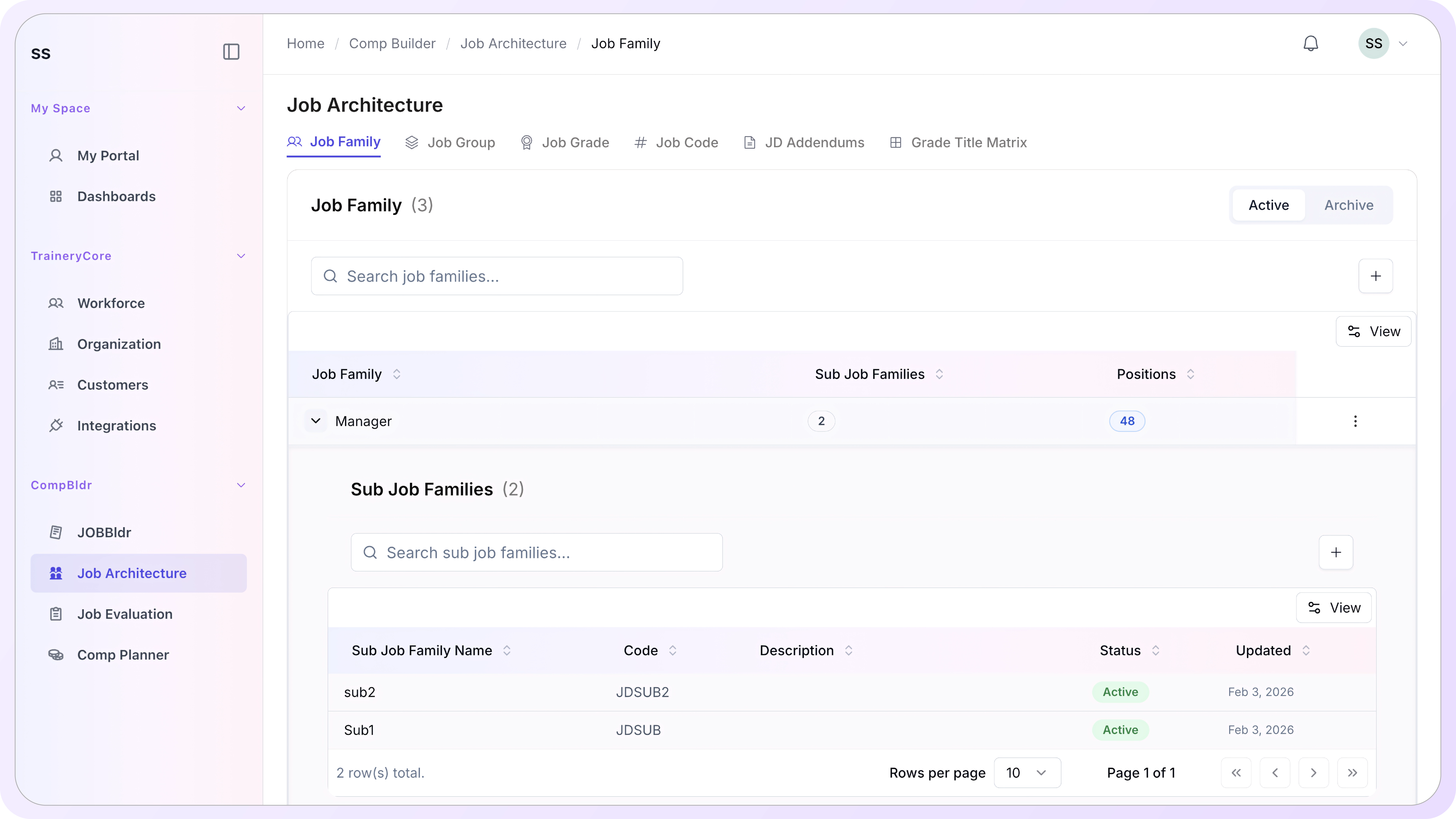
Job Family is the highest-level classification in the architecture model. Each family represents a broad capability domain. Sub-families add precision within each domain and track how many positions are already mapped to each branch.

Create top-level job families with a unique family code and display name
Expand each family into sub-families that reflect distinct capability areas within the domain
Track position count per family and sub-family so administrators see downstream usage at a glance
Archive families without deleting them, preserving the historical record
User interface of Job Architecture section showing Job Family 'Manager' with 2 sub job families and 48 positions, and details of sub job families with status active.

Cluster Titles by Work Domain. Give Every Role a Unique Code.

Job Groups cluster titles by practical work domain alongside the family taxonomy, such as API Engineering, Backend Development, and HR Administration. Job Codes give every role a structured unique identifier that travels across every CompBldr module without manual cross-referencing.
Create groups that reflect how your organization actually organizes work, not just how HR classifies roles
Assign titles to groups independently of their family classification
Job codes encode family, sub-family, grade, and sequence in a single identifier: ENG-FSD-G1-001
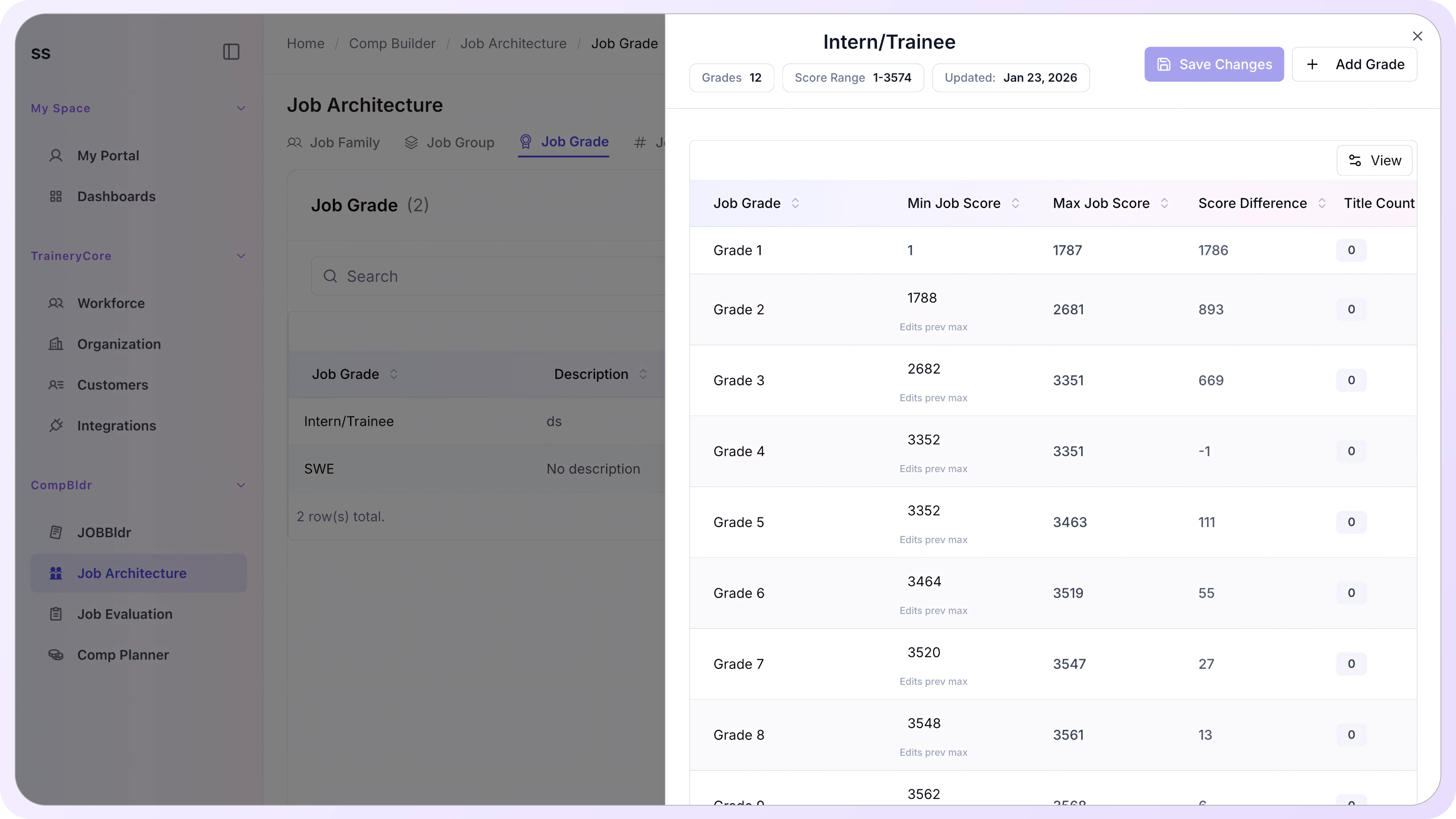
User interface showing job grades from 1 to 12 for Intern/Trainee with details on min and max job scores, score differences, and title count all set to 0.

Build a Score-Based Grade Structure With Reviewable Assignments

Once score boundaries are configured, evaluated roles can be mapped consistently to grade ranges. Changes remain reviewable and versioned rather than silently overriding prior assignments.

Define up to 12 grade levels with minimum and maximum JESAP point ranges for each
Grade-boundary changes are reviewed before downstream assignments are updated
Job Architecture screen showing Job Codes SE-INTERN-001 and ENG01 with titles count, creation and last update dates, categorized under Software Developer occupation.

See Every Role, Every Grade, Every Family. In One View.

The Grade Title Matrix maps titles across families, sub-families, and grade levels in one view. Detailed, Compact, and Grid modes help HR, Finance, and leadership review the structure at the level of detail they need.

Detailed view: full family, sub-family, grade, code, and title for every position
Compact view: summary-level overview for leadership and Finance presentations
Grid view: visual matrix showing coverage and gaps across families and grades at a glance
Any gap in the matrix is flagged, including roles without a grade, grades without a title, and families without codes
User interface showing job grades from 1 to 12 for Intern/Trainee with details on min and max job scores, score differences, and title count all set to 0.

Frequently Asked Questions

What is job architecture software?

Job architecture software is a platform that defines and governs the structural taxonomy behind an organization's roles: job families, sub-families, grades, groups, and codes. In CompBldr, Job Architecture is the setup layer that ensures every job description, evaluation, and pay decision starts from a governed foundation.

What is a job family and why does it matter?

A job family is a top-level classification that groups roles by broad capability domain, such as Engineering, Product Management, or Human Resources. It matters because downstream decisions—from job description authoring to compensation benchmarking—depend on roles being organized into a consistent, searchable taxonomy rather than created in isolation.

What is a job grade and how is it determined in CompBldr?

A job grade is a level band with a minimum and maximum JESAP evaluation score range. Roles are placed into grades based on their JESAP score, not manager judgment. CompBldr supports up to 12 grades with configurable score boundaries. Every grade configuration is versioned and timestamped.

What is the Grade Title Matrix and how is it used?

The Grade Title Matrix is the synthesis view of Job Architecture. It maps every job title across families, sub-families, and grade levels in one grid. Administrators use it to see the full role taxonomy, identify structural gaps, and confirm that every title has a governed family, grade, and code assignment before authoring begins.

What is a job code and how is it structured?

A job code is a unique structured identifier for each role: family prefix, sub-family code, grade indicator, and sequence number, for example, ENG-FSD-G1-001. Job codes make titles uniquely identifiable and reusable across JobBldr, Job Evaluation, and Compensation Planning without manual cross-referencing or duplicate title management.

What is the difference between a job family and a job group?

Job families classify roles by broad capability domain and form the foundation of the taxonomy. Job groups cluster titles by practical work domain, such as API Engineering or Backend Development, and sit alongside the family structure as an additional layer for searching, reporting, and organizing related roles.

How does Job Architecture connect to the rest of CompBldr?
Can job grades be changed after roles have been assigned to them?

Yes. Job grades can be edited and the framework can be versioned. Each version is saved with the editor's name, timestamp, and a review step before publishing. Titles already assigned to a grade are not automatically regraded. Changes to grade boundaries are reviewed and applied deliberately, not automatically pushed downstream.

How many job families and grades does CompBldr support?

CompBldr Job Architecture supports an unlimited number of job families and sub-families. The grading framework supports up to 12 grade levels with configurable score ranges between each. The Grade Title Matrix scales to show all families and grades in a single view with search, filter, and jump-to-family navigation for large taxonomies.

Build Your Job Architecture Once. Govern Every Role That Follows

When the foundation is right, everything built on top of it—job evaluation, market benchmarking, salary bands, and compensation planning—becomes easier to govern and defend.

15-minute walkthrough · See the job architecture workflow using real product screens
