Job Evaluation Software for Structured Point-Factor Scoring
Evaluate and grade roles with JESAP®, CompBldr's structured 15-factor point-factor job evaluation methodology. Factor scores, evaluator details, timestamps, versions, and grade decisions are recorded so HR can review how each leveling outcome was reached.
.svg)
For compensation teams that need consistent grade decisions supported by factor scores, evaluator records, timestamps, version history, and documented review.
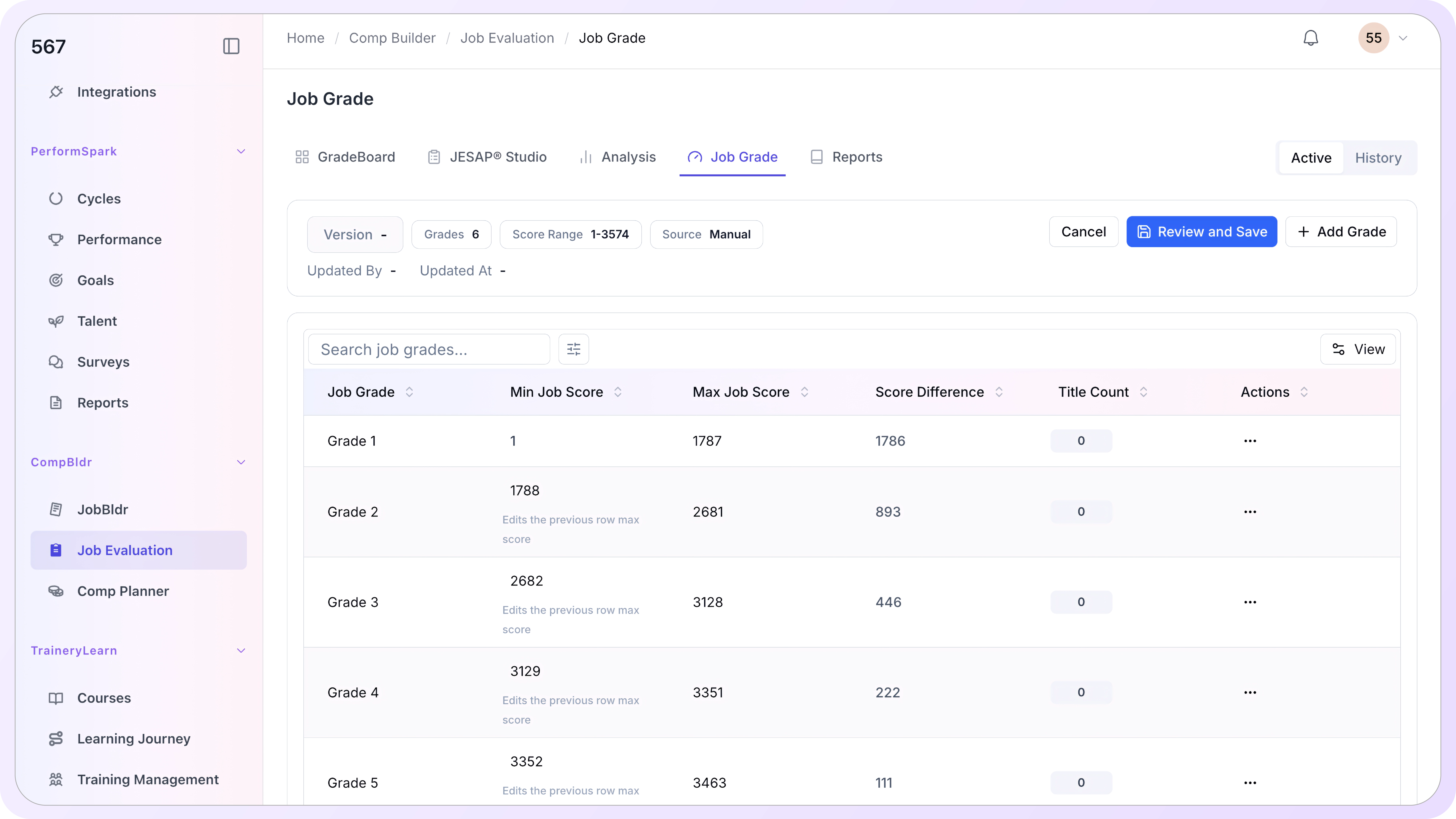
structured JESAP compensable factors used in the point-factor evaluation workflow
evaluation records preserve factor scores, evaluator details, timestamps, total points, and grade outcomes
manual and algorithm-based evaluation versions can be compared without replacing evaluator judgment
Four Screens. The Full Evaluation Workflow
JESAP® is the 15-factor methodology used in CompBldr's job evaluation workflow. Developed by JER HR Group in the 1990s, it provides a structured point-factor framework for evaluating roles across defined compensable factors.
.svg)
JESAP Studio: Factor-by-Factor
Each factor's description and degree definitions are displayed in the same panel where you select a degree. The running score and proposed grade update automatically across all 15 factors.

Quick Evaluation Mode
All 15 factors appear in one scrollable overlay with degree buttons inline, helping evaluators complete a full position assessment without switching between separate scoring screens.
.svg)
Grading & Versions
Every saved evaluation becomes a numbered version with full factor scores, evaluator name, and timestamp. Side-by-side color-coded diffs show scoring changes instantly.
AI Calibration
Algorithm-based evaluation versions can be compared with human evaluations as a calibration aid, helping teams review scoring differences without replacing evaluator judgment.
No More Invisible Grades. Every Score Documented, Every Version Saved
Here's what the evaluation workflow looks like inside CompBldr, from first factor score to final grade assignment.
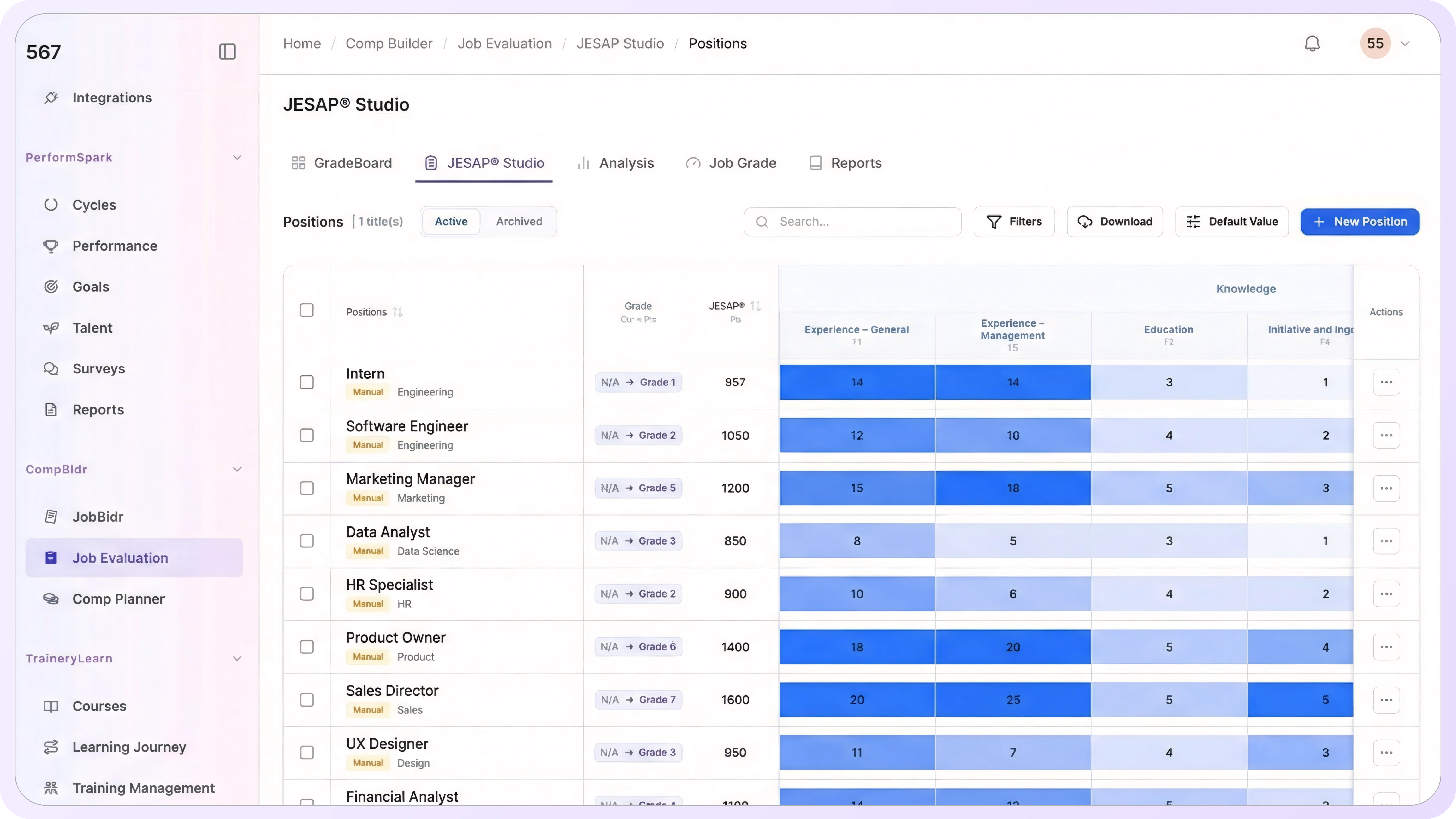
Score Every Role Factor by Factor. Definitions Always in View.
The JESAP Studio presents all 15 evaluation factors with their full definitions and level descriptors visible during scoring. Evaluators do not have to guess what a score means—the methodology remains in view throughout the evaluation.
.svg)
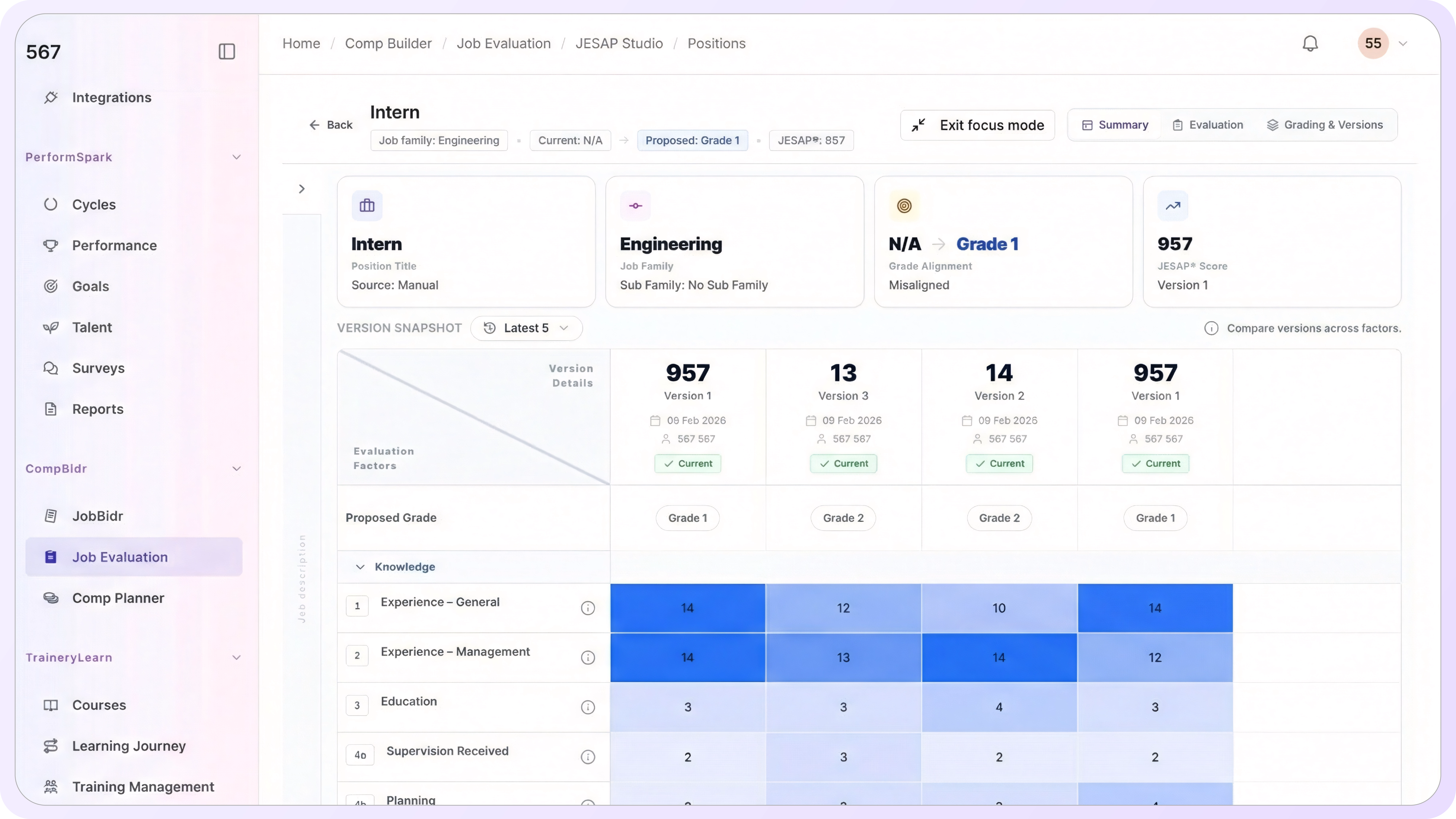
Compare Every Version. Review Every Grade.
Every version of JESAP evaluation is captured and stored with details like name, date, scores, total points, and resulting grade.
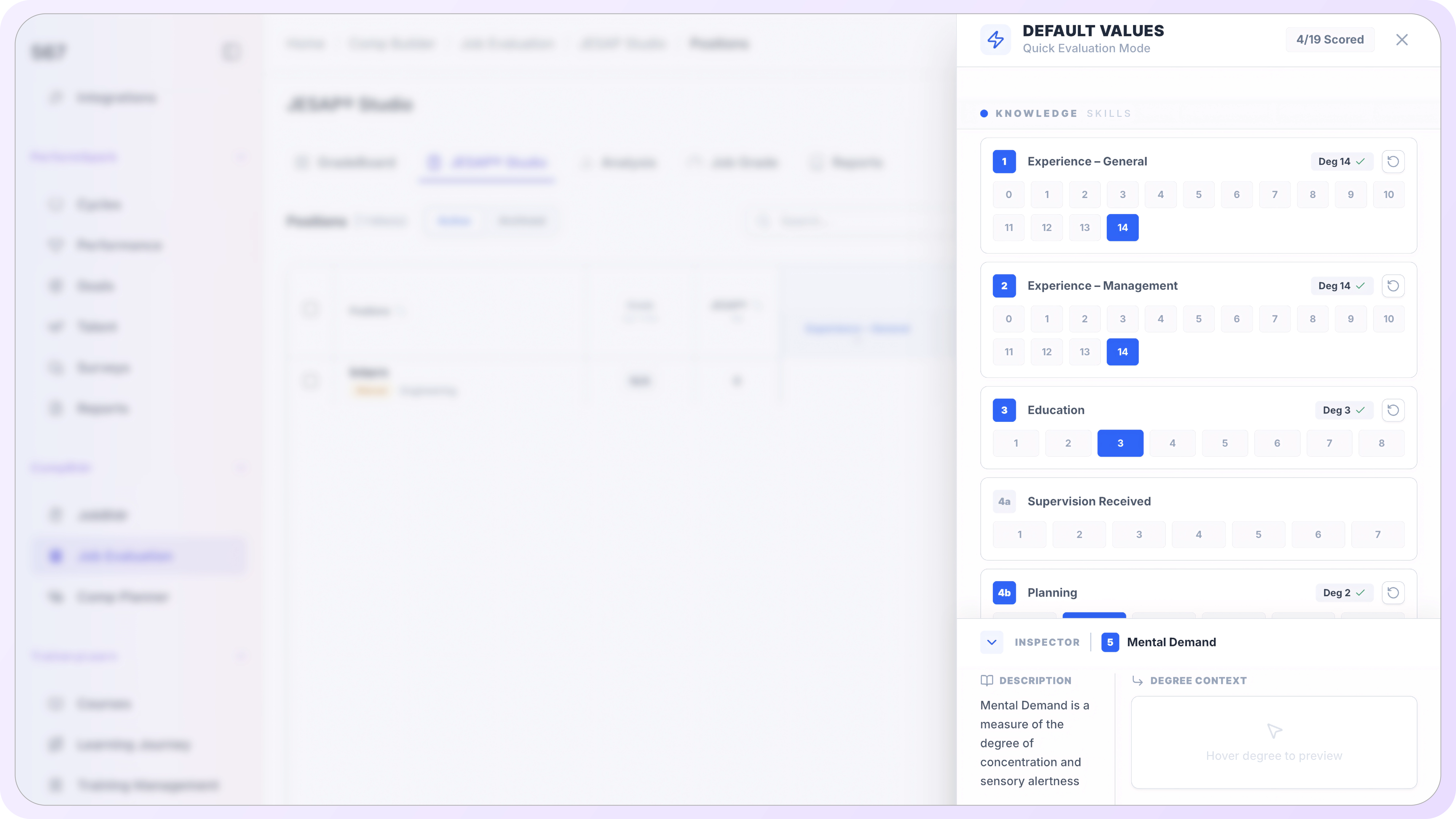
Evaluate Roles Without Switching Between Scoring Screens.
Quick Evaluation Mode surfaces all 15 JESAP factors in one scrollable overlay with degree selection buttons inline. Evaluators can work through the full factor set without tab-switching or manual grade calculation.
CompBldr can present algorithm-based evaluation output alongside human evaluation versions for calibration and review. Teams can compare factor-level scoring differences while keeping human evaluation and approval as the decision point.
The 15 JESAP®
Compensable Factors
Four factor groups covering everything a job requires, impacts, and demands.
.svg)
Knowledge and Skill Requirements: 6 factors
Contacts / Human Relations: 2 factors
Responsibilities: 4 factors

Efforts: 3 factors
Frequently Asked Questions

The evaluator selects a factor from the left panel. The right panel loads the factor description, quick-select degree buttons (0 through 14), and degree definitions for every available level. Clicking a degree button selects it, highlights the corresponding definition, and updates the running JESAP score and proposed grade automatically.

Quick Evaluation Mode is a slide-in overlay panel that shows all 15 JESAP factors in one scrollable view, organized by category. Degree buttons are inline per factor. An Inspector at the bottom loads the active factor's description and degree context as the evaluator taps through the list. A full evaluation can be completed without switching screens.
Grading & Versions displays every saved evaluation for a position as a numbered version column in a side-by-side grid. Factor scores fill the rows with blue-intensity shading, darker cells mean higher degrees. The Current badge marks the active version. Any version can be switched to active, archived, or used as the basis for a new evaluation.
Blue-intensity shading reflects the degree selected for each factor in each version. Darker blue means a higher degree score. Pale blue means a lower degree. An empty cell with a dash means the factor was not scored in that version. Reading a row left to right shows how the same factor was scored across all evaluations without manual comparison.
Algorithm-based evaluation output can be reviewed alongside saved human evaluation versions as a calibration aid. Evaluators can compare factor selections and scoring differences without the system replacing their judgment.
Job Grade defines the score bands that translate JESAP totals into grade assignments. Each grade has a minimum and maximum score. When an evaluator selects degrees in JESAP Studio, the running JESAP score is measured against the active Job Grade structure, and the Proposed Grade in the header updates automatically. Auto-linked ranges prevent gaps between grades.
Auto-linked score ranges ensure that grade bands connect without gaps or overlaps. When a grade's maximum score is changed, the system automatically adjusts the minimum score of the next grade. This keeps the grade structure continuous and prevents scoring gaps between grades.
Yes. Every grade structure change creates a new version, not an overwrite. The prior structure moves to the History view with its version number, score range, source, evaluator, and timestamp preserved. Any historical version can be restored as the active structure. When a prior version is restored, the current structure moves to History.
Grade structures can distinguish between manually entered score boundaries and boundaries produced through a configured calculation method. Compensation teams should review the resulting grade structure before applying downstream assignments.
Every Grade Scored. Every Version Saved. Every Decision Documented.
JESAP scores support Job Architecture and Market Benchmarking workflows. Grade-structure changes can be reviewed before downstream assignments are updated.
See the job evaluation workflow · Review JESAP scoring · Ask implementation questions


.svg)

.svg)
.svg)

