
Job Architecture

73% of Orgs Have Inconsistent Titles. Build One Structure Everyone Uses

Job Architecture defines families, grades, codes, and levels, giving every role a governed structural address before anything else happens. This is the foundation every other module builds on.

End title inflation
One taxonomy
Foundation for everything

The structural foundation CHROs present to the board and CFOs use to defend headcount decisions.
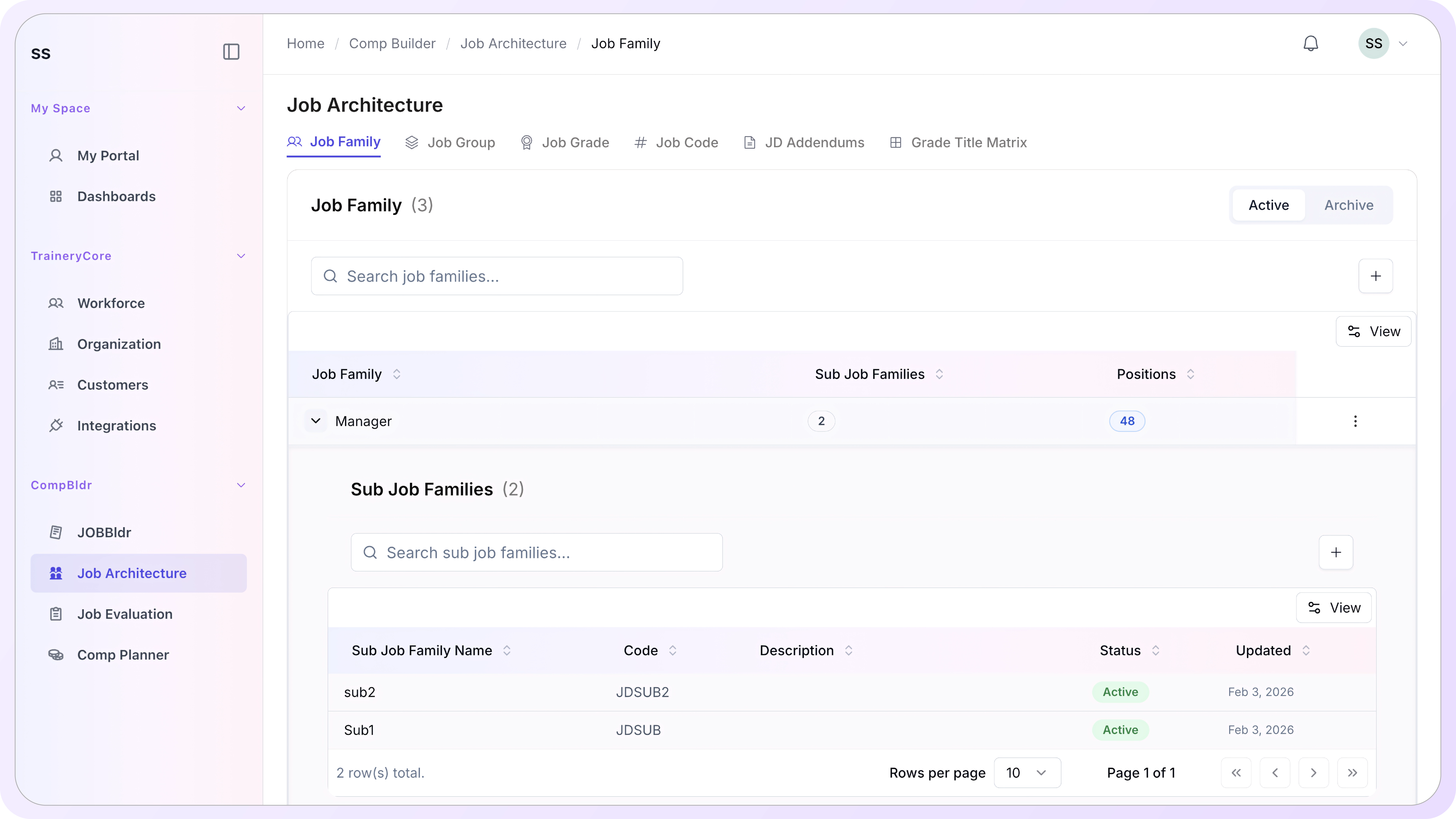
CompBldr Job Architecture interface

Salary Paycheck Calculator

Estimate federal, state, and FICA withholding and see your take-home pay update live as you type.

How are you paid?
Any overtime or extra pay?

A one-time bonus is taxed once using the IRS 22% flat supplemental-wage rate and is not multiplied out across the year. A recurring bonus/commission is folded into your regular wages and annualized like normal pay — pick recurring only if you actually receive this amount every single pay period.

Overtime pay uses a wage-weighted average hourly rate across all your hourly pay lines (or salary ÷ 2,080 if you're salaried), per FLSA regular-rate rules.

Older W-4s (2019 and earlier) used withholding allowances instead of the dependent/income fields on the current form.

Year-to-date wages (optional)

If you started this job partway through the year, got a raise, or want an accurate Social Security cap / Additional Medicare threshold, enter what you've already been paid this year. Leave at $0 to assume a full, level year at the current pay rate.

Exemptions
Exempt from federal income tax
Exempt from Social Security tax
Exempt from Medicare tax

We prefill a representative estimated rate per state. States with brackets, local taxes, or reciprocity agreements will differ from this estimate — override with your own state's official withholding tables for precision.

Exempt from state withholding

These are calculated as pre-tax benefits (excluding Roth 401(k)), meaning they're excluded from taxable wages before federal, state, and FICA taxes apply. Enter amounts per pay period.

401(k) traditional reduces taxable wages for federal and state tax (not FICA). Roth 401(k) is post-tax and does not reduce taxable wages. Note: this tool does not enforce annual IRS elective-deferral limits — don't rely on it to check contribution-limit compliance.

Take home
$0.00
Take-home pay0%
Taxes0%
Benefits & deductions0%
Earnings
Gross pay$0.00
Taxes
Federal income tax$0.00
Social Security$0.00
Medicare$0.00
State income tax$0.00
Benefits & deductions
Pre-tax benefits$0.00
401(k) traditional$0.00
Roth / post-tax$0.00
Net pay$0.00
How this is calculated

This calculator follows the same general sequence payroll systems use, based on IRS Publication 15-T withholding methodology and current FICA rules. It's an estimate for planning purposes, not a substitute for your actual paystub or a tax professional.

Gross payΣ salary/hourly lines + overtime + recurring bonus, converted to your selected pay frequency. A one-time bonus is tracked separately and taxed once, not folded into this base.
OvertimeWage-weighted average hourly rate × multiplier × OT hours, per FLSA regular-rate rules
Pre-tax wagesGross pay − pre-tax benefits − 401(k) traditional
Federal taxAnnualize pre-tax wages → apply the 2026 Percentage Method Adjusted Annual Wage worksheet (Standard, or Step 2 Checkbox schedule if checked; or the allowance-based method for pre-2020 W-4s) → subtract dependent credits → divide back to your pay period
One-time bonusTaxed once using the IRS 22% flat optional supplemental-wage method (37% on amounts over $1M of YTD supplemental wages, not modeled here) — added once to your annual federal tax, never multiplied by pay periods
Nonresident alienPer IRS Pub. 15-T, add a fixed amount to taxable wages before computing federal withholding: Table 1 (~$11,800/yr) for pre-2020 W-4s, Table 2 (~$16,100/yr) for 2020-or-later W-4s; filing status is locked to Single / Single-or-MFS and exempt status can't be claimed
Social Securitymin(current-period taxable wages, remaining room under the $184,500 annual cap after your YTD SS wages) × 6.2%
MedicareTaxable wages × 1.45%, plus 0.9% on wages (YTD + current) above a flat $200,000/year threshold that applies regardless of filing status
State taxTaxable wages × estimated state rate (flat-rate estimate — see note in the State Taxes tab)
Net payGross pay (incl. any one-time bonus) − federal tax − Social Security − Medicare − state tax − benefits − 401(k) − Roth

Figures used: 2026 federal brackets and standard deductions (Single/MFS $16,100, MFJ $32,200, HoH $24,150), Social Security wage base $184,500, Medicare 1.45% + 0.9% additional on wages over $200,000 for every filing status. State rates are simplified single-rate estimates — many states use their own bracket systems, local taxes, or reciprocity rules this tool doesn't model. This tool also doesn't enforce 401(k)/FSA contribution limits or model local/city taxes and SDI/PFL payroll deductions.

This calculator provides general estimates for planning purposes only and should not be relied on to calculate exact taxes, payroll, or other financial data. Consult a payroll or tax professional for guidance specific to your situation. — compbldr.ai

Frequently Asked Questions

What is job architecture software?

Job architecture software is a platform that defines and governs the structural taxonomy behind an organization's roles: job families, sub-families, grades, groups, and codes. In CompBldr, Job Architecture is the setup layer that ensures every job description, evaluation, and pay decision starts from a governed foundation.

What is a job family and why does it matter?

A job family is the top-level classification grouping roles by broad capability domain, Engineering, Product Management, and Human Resources. It matters because every downstream decision, from job description authoring to compensation benchmarking, depends on roles being organized into a consistent, searchable taxonomy rather than created in isolation.

What is a job grade and how is it determined in CompBldr?

A job grade is a level band with a minimum and maximum JESAP evaluation score range. Roles are placed into grades based on their JESAP score, not manager judgment. CompBldr supports up to 12 grades with configurable score boundaries. Every grade configuration is versioned and timestamped.

What is the Grade Title Matrix and how is it used?

The Grade Title Matrix is the synthesis view of Job Architecture. It maps every job title across families, sub-families, and grade levels in one grid. Administrators use it to see the full role taxonomy, identify structural gaps, and confirm that every title has a governed family, grade, and code assignment before authoring begins.

What is a job code and how is it structured?

A job code is a unique structured identifier for each role: family prefix, sub-family code, grade indicator, and sequence number, for example, ENG-FSD-G1-001. Job codes make titles uniquely identifiable and reusable across JobBldr, Job Evaluation, and Compensation Planning without manual cross-referencing or duplicate title management.

What is the difference between a job family and a job group?

Job families classify roles by broad capability domain and form the foundation of the taxonomy. Job groups cluster titles by practical operational work domain, API Engineering and Backend Development-and sit alongside the family structure as an additional filter layer for searching, reporting, and organizing related roles.

How does Job Architecture connect to the rest of CompBldr?

JobBldr draws family, sub-family, grade, and code values directly from Job Architecture when a user authors a job description. Job Evaluation references grade ranges to validate JESAP scores. Compensation Planning uses family and grade data to apply merit matrix guidelines and pay range assignments. All modules read from the same governed architecture.

Can job grades be changed after roles have been assigned to them?

Yes. Job grades can be edited and the framework can be versioned. Each version is saved with the editor's name, timestamp, and a review step before publishing. Titles already assigned to a grade are not automatically regraded. Changes to grade boundaries are reviewed and applied deliberately, not automatically pushed downstream.

How many job families and grades does CompBldr support?

CompBldr Job Architecture supports an unlimited number of job families and sub-families. The grading framework supports up to 12 grade levels with configurable score ranges between each. The Grade Title Matrix scales to show all families and grades in a single view with search, filter, and jump-to-family navigation for large taxonomies.

Build the Taxonomy Once. Govern Every Role That Follows

When the foundation is right, everything built on top of it evaluations, bands, merit cycles is defensible by default.

No credit card · 15-minute walkthrough · Most teams invest $25K-$120K/year

