

.svg)





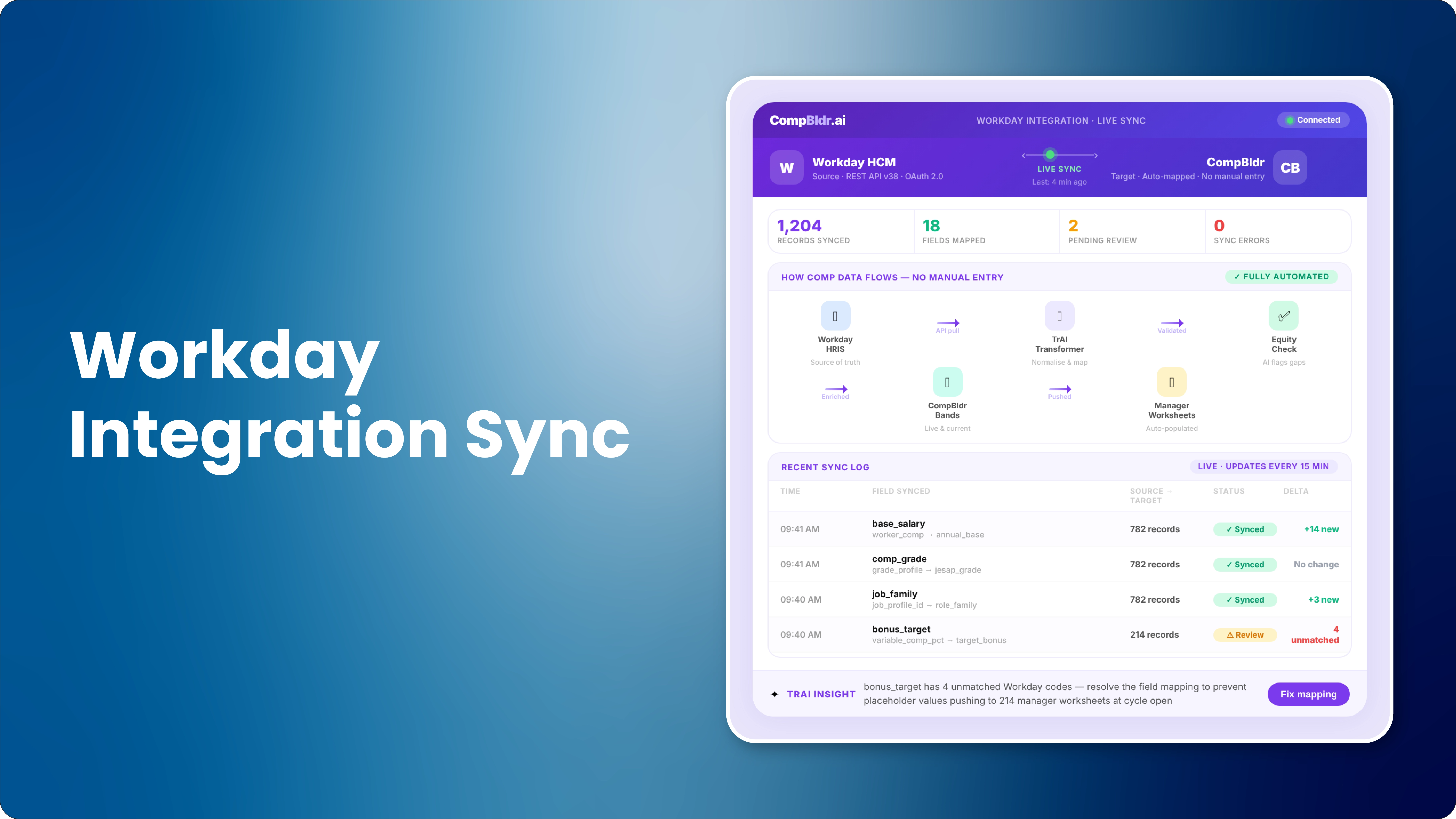

If your team runs its merit cycle in a compensation platform and then manually exports the results into Workday, you are not using an integrated system. You are using two disconnected tools with a spreadsheet bridge in between. Every export is a data entry risk. Every version mismatch is an audit liability. Every approved increase that takes an extra three days to land in Workday is three days where payroll and HR records disagree.
CompBldr's integration with Workday HCM eliminates that loop entirely. This guide explains exactly what syncs, in which direction, how it is configured, and what CompBldr adds to the governance process that Workday Compensation does not provide on its own.
Why Manual Export Between Workday and Comp Tools Is a Liability
The spreadsheet loop that creates version risk
The standard workaround when a compensation platform does not integrate with Workday looks like this: HR pulls a headcount export from Workday, uploads it to the compensation tool, runs the merit cycle, exports the results as a CSV, and manually imports those results back into Workday. The headcount export is typically a few days old by the time the cycle opens. The results import is done manually by someone working from a spreadsheet. At every step, there are version control risks, formula errors, and field mapping inconsistencies that accumulate silently until payroll runs or an audit request arrives.
What breaks when merit data and HR data live in separate systems
When Workday holds the HR record and a disconnected tool holds the compensation decision, the two systems drift apart. An employee promoted in Workday may not be reflected in the comp tool until the next manual sync. A merit increase approved in the comp tool may not appear in Workday for days. Managers who compare their approved proposals to what appears in Workday may see different numbers and raise questions that consume HR bandwidth during the most time-sensitive weeks of the year.
The regulatory exposure from undocumented comp changes
Pay transparency laws in California, Colorado, New York, and other jurisdictions require that salary changes be documented with the methodology that produced them. When a merit increase is applied to Workday by manual import, there is no documentation in Workday of who approved it, what data drove the decision, or what salary band it was measured against. That documentation gap is exactly what EEOC examiners and pay equity auditors request first. CompBldr's bidirectional integration writes the approval record directly into Workday alongside the salary change, closing the documentation gap at the point of entry.
What the CompBldr + Workday Integration Syncs
What flows from Workday into CompBldr (inbound)
The inbound sync pulls the employee and job data CompBldr needs to open a governed compensation cycle. The sync runs on a configurable schedule, nightly by default, with on-demand triggers available for mid-cycle headcount changes.
Employee record fields synced on schedule
- Employee ID and full name
- Current base salary and pay rate type (hourly or salary)
- Employment status and FTE percentage
- Location, department, and cost center
- Manager and HR Business Partner assignments
- Hire date and most recent salary change date
- Performance rating when sourced from Workday Performance
Job architecture fields: grade, family, level, job code
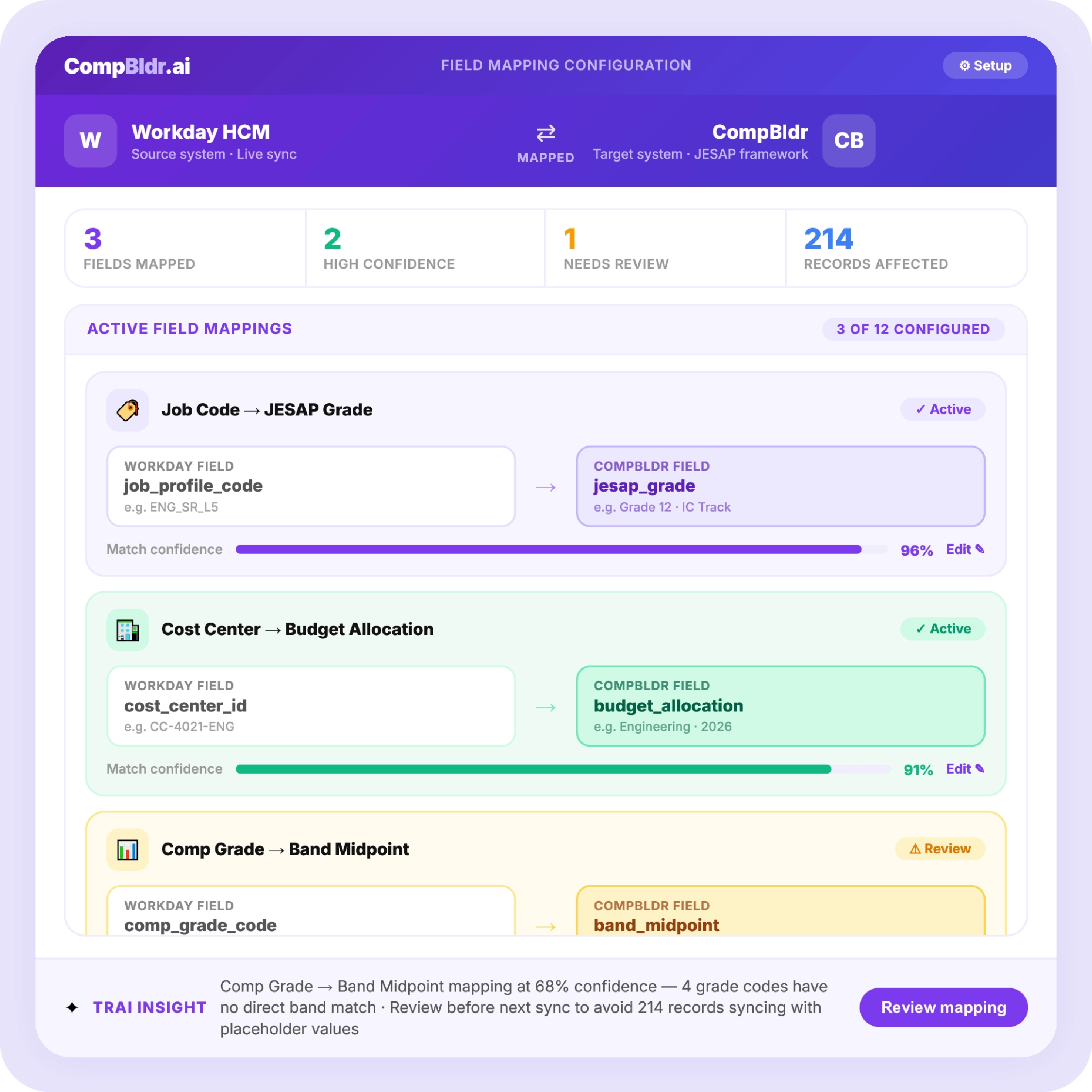
CompBldr maps Workday's job profile, job family, job level, and compensation grade to the corresponding JESAP-evaluated grade in the CompBldr job architecture. This mapping is configured once during implementation and maintained as an auditable field map. When a Workday compensation grade maps to CompBldr Grade 5, every employee in that grade receives the correct salary band for their grade automatically. There is no manual band assignment.
What flows from CompBldr back to Workday (outbound)
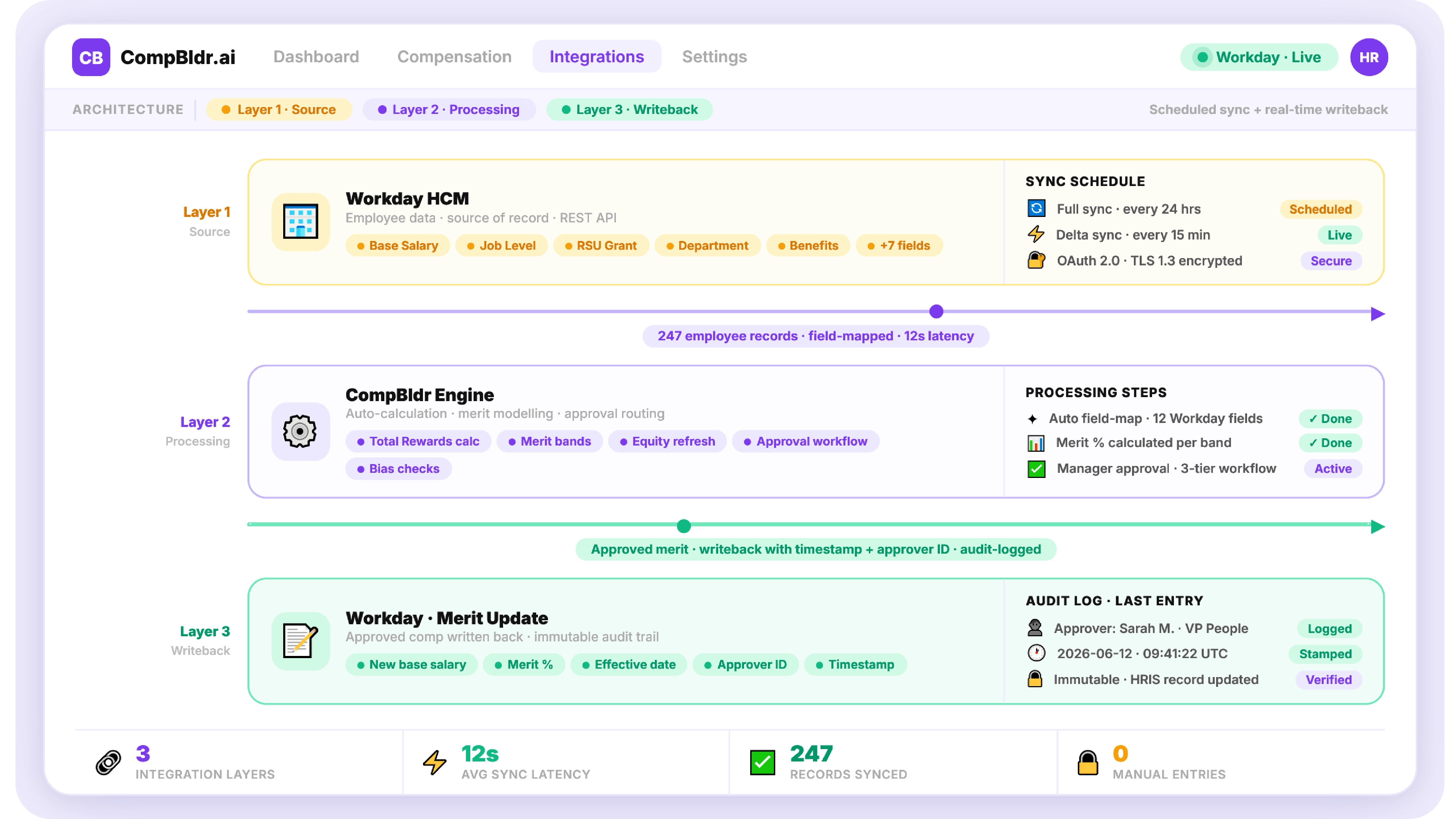
The outbound sync writes approved compensation actions from CompBldr back to Workday after the approval workflow closes. Each writeback includes the compensation change value, the effective date, the approver identity, and the reason code.
Merit increase writeback after approval
When a manager submits a merit increase proposal, and it clears the configured approval chain in CompBldr (typically Manager, HR Business Partner, and Finance), the approved new salary writes to the Workday compensation record on the configured effective date. The CompBldr approval log is attached as a note field in Workday, creating a traceable link between the salary change and the governance decision that produced it.
Equity adjustment writeback with reason code
Equity adjustments applied in CompBldr (for compression corrections, market movement, or pay equity findings) write back to Workday with a distinct reason code that differentiates them from merit increases. This distinction is important for EEOC pay-data reporting, which requires compensation actions to be categorized by type.
Promotional increase writeback with grade change
When a promotion is processed in CompBldr, the writeback includes the new base salary and grade code, updating the compensation record and job profile in Workday simultaneously. This eliminates the mismatch that occurs when compensation is updated in one system before the grade change is reflected in the other.
How the Bidirectional Sync Works Step by Step
Step 1: Initial data pull from Workday
During implementation, CompBldr performs a full historical pull from Workday: all active employees, their current compensation records, job profiles, and organizational structure. This initial pull populates the CompBldr employee database and establishes the baseline compa-ratio for every employee before the first cycle opens. The pull is authenticated through Workday's REST API using OAuth 2.0, with credential management handled by CompBldr's implementation team.
Step 2: CompBldr configures salary bands using Workday job data
After the initial data pull, CompBldr's implementation team maps Workday compensation grades to JESAP-evaluated grades in the CompBldr job architecture. Salary bands are built for each grade using Radford, Mercer, and WTW survey data, blended using weights configured by job family. The result is a salary band structure where every Workday employee has a documented compa-ratio from day one.
Step 3: Managers submit merit proposals in CompBldr
When the merit cycle opens, each manager accesses the CompBldr manager portal and sees their direct reports with current salary, compa-ratio, performance rating, and the merit matrix range applicable to each employee. Proposals submitted outside the budget allocation trigger a flag and route to the approval chain for review. The budget consumption dashboard updates in real time as proposals arrive, visible to HR and Finance simultaneously.
Step 4: Approved changes write back to Workday automatically
After the final approval in CompBldr, the approved compensation actions are queued for the outbound sync. The sync runs on the configured schedule (default: nightly) or can be triggered manually for time-sensitive changes. Each change writes to the Workday compensation record with the effective date, reason code, and CompBldr approval reference number.
Step 5: Audit trail in CompBldr logs every action
Every action in the compensation cycle, including the proposal, each approval stage, any revision, and the final writeback, is logged permanently in CompBldr with the user identity, timestamp, and previous value. This log is queryable, exportable, and cannot be retroactively edited. For organizations subject to OFCCP examination or pay equity litigation discovery, this log is the documentation package that would otherwise require weeks of manual reconstruction.
🚀 See CompBldr Connected to Your HRIS in 15 Minutes
CompBldr integrates with Workday HCM, BambooHR, Rippling, and other major HRIS platforms. If your org runs Workday, the integration configures in one implementation session. See it working on your data.
Field Mapping: How Workday Data Connects to CompBldr's Governance Structure
JESAP grade to Workday compensation grade
The most important field mapping in the integration is between Workday's compensation grade and CompBldr's JESAP-evaluated grade. CompBldr evaluates each job profile using the JESAP 15-factor framework to assign a documented grade score. That score maps to a grade, and that grade maps to a salary band. When Workday sends compensation grade CG-5 for a Software Engineer, CompBldr maps this to JESAP Grade 5 and applies the Grade 5 salary band for that job family. The mapping is documented, versioned, and auditable.
Cost center to CompBldr budget allocation
Workday cost center data populates the budget allocation structure in CompBldr. Each cost center receives a merit budget allocation calculated from the total merit budget percentage set by Finance. Managers see their specific budget as both a dollar amount and a percentage of their team's current payroll, updated in real time as they submit proposals.
Performance rating from Workday to CompBldr merit matrix
If performance ratings are managed in Workday Performance, CompBldr syncs the most recent rating for each employee and populates the merit matrix cell that applies to their performance tier and compa-ratio position. This eliminates the manual step of mapping performance data to the comp tool that creates errors in every manual integration process.
What CompBldr Adds That Workday Compensation Alone Does Not Provide
JESAP job evaluation connected to Workday grade structure
Workday Compensation stores grade and salary range data but does not evaluate the job against compensable factors to produce a documented grade placement. CompBldr's JESAP framework evaluates each role against 15 factors spanning knowledge, complexity, accountability, and conditions, producing a score that determines the grade. That score is documented, traceable, and defensible when an employee, regulator, or auditor asks why a role was placed in Grade 5 rather than Grade 6. Workday records the grade. CompBldr explains why.
Merit matrix governance with real-time budget tracking
Workday Compensation can process merit increases but does not configure a merit matrix that differentiates increases by performance rating and compa-ratio. CompBldr's merit matrix ensures that budget is directed toward high performers at lower pay positions rather than distributed uniformly. Finance and HR see a real-time budget consumption dashboard as proposals accumulate. The cycle does not close with budget surprises.
TrAI pay equity flagging during the merit cycle
TrAI is CompBldr's AI engine. During a merit cycle, TrAI monitors manager proposals in real time and flags patterns that signal pay equity risk: systematic differences in proposed increases between demographic groups at the same grade and performance level, managers proposing identical flat percentages for all direct reports regardless of compa-ratio, or employees approaching the band maximum without a grade change review. These flags surface in HR's dashboard before the cycle closes, when correction is straightforward.
Security and Compliance: How the Integration Is Protected
Data encryption in transit and at rest
All data in transit between Workday and CompBldr is encrypted using TLS 1.3. Data at rest in CompBldr is encrypted using AES-256. API credentials for the Workday integration use OAuth 2.0 with token rotation on a defined schedule.
Audit trail for every field change
Every field value that changes in CompBldr, whether from a Workday sync update, a manager proposal, or an HR administrative action, is logged with the previous value, the new value, the source of the change, and the timestamp. This immutable log is the evidence that OFCCP examinations, pay equity audits, and employment litigation discovery require. It is maintained permanently and cannot be overwritten.
If your compensation cycle still ends with a spreadsheet export to Workday, the CompBldr integration closes that loop permanently. Configuration is completed during implementation. The first governed merit cycle can begin within eight weeks. Book a 15-Minute Integration Demo


.svg)

.svg)
.svg)

