Replace Compensation Spreadsheets With a Governed Pay Workflow
CompBldr helps HR, Total Rewards, and Finance replace compensation spreadsheets with one governed workflow for employee data, budgets, manager proposals, approvals, pay-position context, exceptions, analytics, and decision history.
.svg)
Move beyond emailed files and version reconciliation. Keep the compensation cycle connected to the governed job, range, market, and employee records that shape each pay decision.
.webp)
Compensation Spreadsheets Break When the Workflow Spreads Across Files
A spreadsheet is not usually the problem by itself. The risk appears when employee data, budgets, manager inputs, exceptions, approvals, and final decisions are spread across different files, owners, and versions.For a direct operating-model comparison, see compensation planning software vs. spreadsheets.
CompBldr keeps the compensation workflow, decision context, approvals, and final records connected instead of forcing HR to reconcile the process after the fact.
.svg)
Versions Drift Before the Cycle Closes
A workbook exported on Monday can be stale by Tuesday after a transfer, promotion, salary change, eligibility update, or reporting-line change.

Budgets Change Faster Than the Workbook
Department budgets and proposed increases change continuously, but spreadsheet consolidation shows the current position only after someone rebuilds the totals.
.svg)
Approvals Move Into Email and Chat
Manager exceptions, approval rationale, and revised recommendations often move into email or chat, separating the final number from the reason it changed.

The Final File Loses Decision History
The final workbook may preserve the outcome without preserving a clear history of who changed a recommendation, who approved it, and which context supported the decision.
Move From Spreadsheet Handoffs to One Governed Compensation Workflow
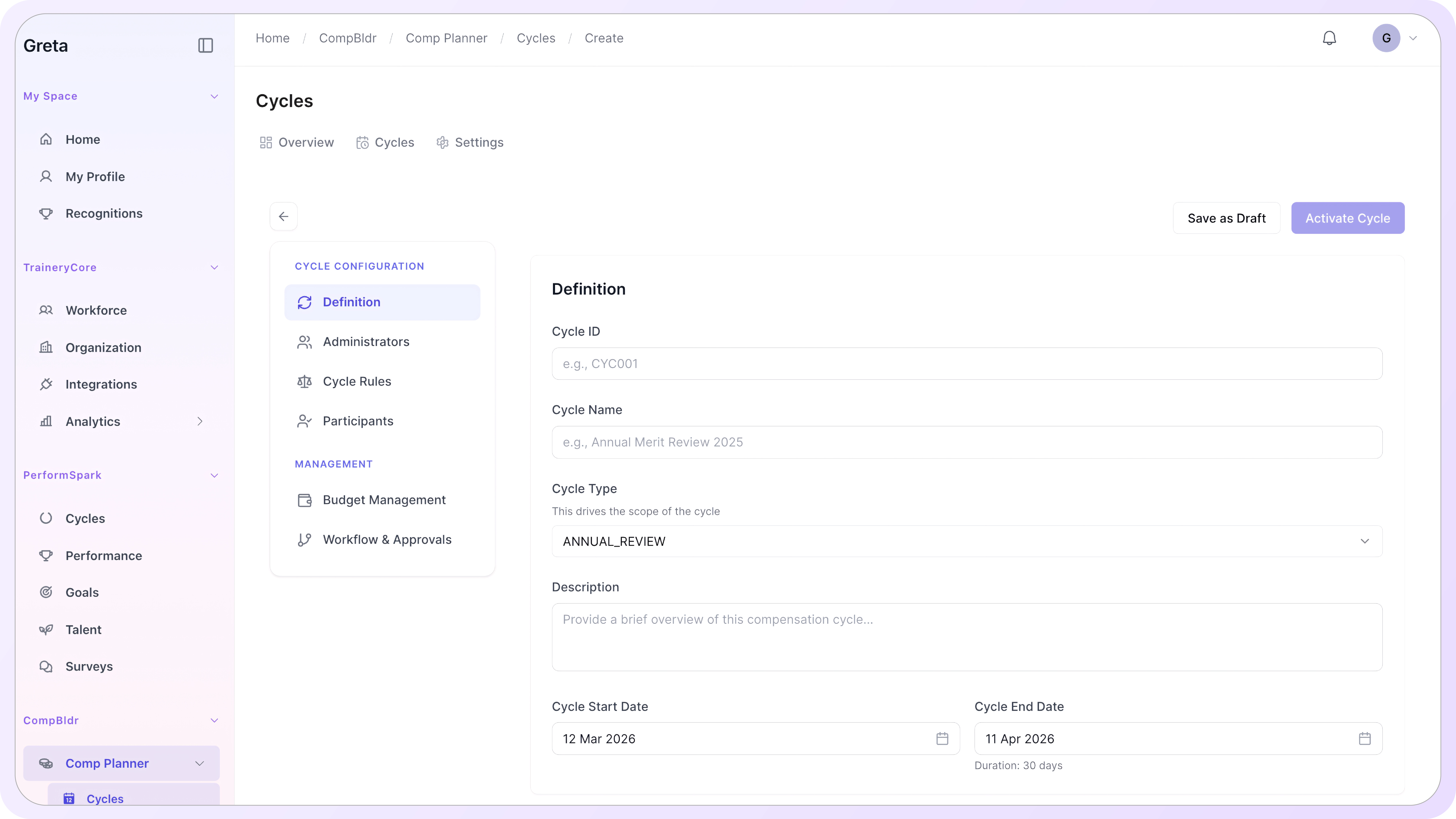
CompBldr replaces the spreadsheet handoff pattern around compensation planning while your compensation team keeps ownership of policy, eligibility, budgets, guidelines, and approval rules.
For cycle controls, see merit cycle automation and real-time budget control.
Start With Current Employee and Job Data
Bring current employee and job data into the cycle. Clear distinctions between job grades and job levels help keep manager decisions tied to governed roles and grades instead of titles copied into separate workbooks.
Set Eligibility, Budgets, and Pay Rules
Configure eligibility, budget pools, increase guidance, cycle dates, approval routes, and other planning rules before managers begin submitting recommendations.
Route Manager Proposals in One Workflow
Give managers current employee pay, salary-range, performance, and budget context while they make recommendations. When the cycle depends on governed salary bands, those ranges stay connected to the pay decisions instead of being copied into another file.
Review Budget, Pay Position, and Exceptions
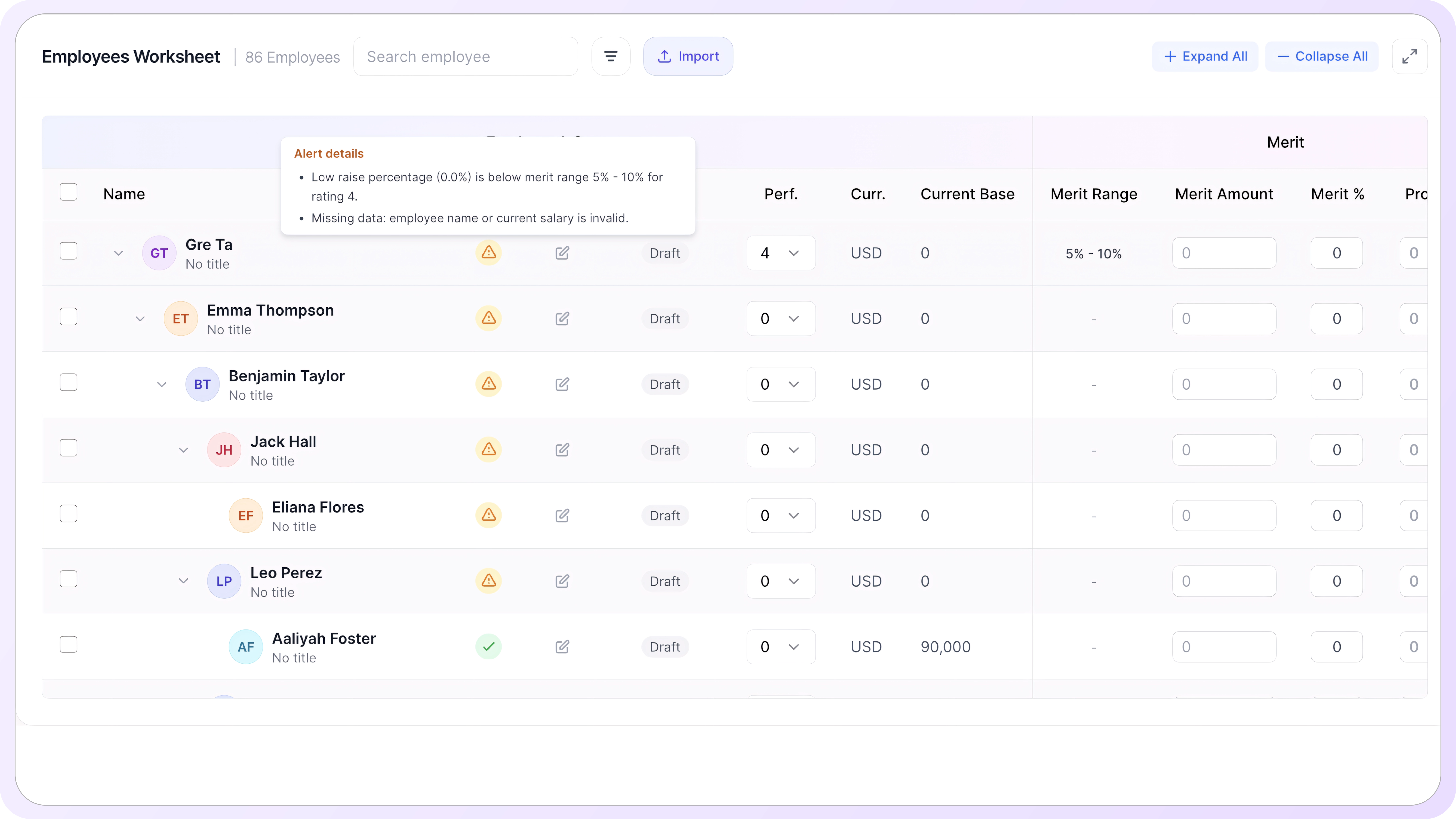
Review proposed increases against budget, pay position, range placement, and exception context. Use compa-ratio and range penetration alongside budget and manager recommendations so Compensation can identify decisions that need closer review before approval.
Finalize Approved Decisions and Preserve History
Finalize approved compensation actions in the same workflow and preserve the resulting decision history for analytics, reporting, and the next cycle.
Control the Cycle, See the Impact, Keep It Governed
CompBldr keeps the information needed to make, review, approve, and explain compensation decisions in the same governed workflow.
Keep Employee, Range, and Budget Context Together
Review employee pay, range position, budget availability, and proposal status together instead of reconciling them from separate workbook tabs.
.svg)
Managers can review current pay and range context, including salary range width by job level, while Compensation controls the rules, budgets, and approval path behind the cycle.
Give Managers Guardrails Before Submission
When a recommendation changes, the underlying compensation context still matters. Keep access to how salary ranges are defined and governed so reviewers can understand the range and pay-position evidence behind the decision.
This gives HR, Total Rewards, and Finance a shared view of employee impact and budget implications before compensation actions are finalized.
Preserve Approvals, Exceptions, and Final Decisions
Approved proposals, exceptions, and compensation decisions remain connected to the reports and records produced from the completed cycle.
That reduces dependence on an emailed workbook labeled “final” as the only record of how the cycle was actually decided.
.webp)
Turn Spreadsheet-Based Reviews Into a
Governed Compensation Cycle
The value of replacing compensation spreadsheets is not simply moving the same cells into a browser. The workflow should reduce version reconciliation, preserve decision context, and make approvals easier to review.
For the governance layer beyond planning, see compensation governance platform.
Configure the Cycle
Configure the employee population, eligibility, budget pools, pay rules, manager access, deadlines, and approval routes before the cycle opens.
Guide Manager Decisions
Give managers current employee pay, salary-range position, available budget, and recommendation context while they work instead of distributing separate files.
Close With a Reviewable Record
Preserve approved pay actions, exceptions, rationale, and final budget outcomes for analytics and reporting without rebuilding the cycle in another spreadsheet.
Spreadsheet Replacement Works When the
Compensation Workflow Is Connected
Compensation spreadsheet replacement works best when planning is connected to job architecture, evaluation, benchmarking, salary ranges, analytics, and reporting rather than operating as another isolated tool.
.svg)
Job Architecture
Job Evaluation
Market Benchmarking

Compensation Planning

Compensation Analytics

Compensation Reporting
Frequently Asked Questions

A spreadsheet can work when one team controls a simple cycle in one authoritative file. Replacement becomes more valuable when multiple managers, changing employee data, budget controls, approvals, exceptions, and reconciliation make it difficult to maintain one current decision state.

CompBldr connects employee pay with job architecture, job evaluation, grades, salary ranges, market benchmarking, planning budgets, proposals, approvals, analytics, and reporting so teams do not need to rebuild that context across separate workbooks.
No. Compensation teams still define eligibility, budgets, pay guidelines, increase logic, exception standards, and approval rules. The software provides a governed workflow for applying and reviewing those decisions consistently.
Yes. Managers can work with the employee and compensation context made available for the cycle, while Compensation and Finance retain control of budgets, guidelines, approval paths, and review rules.
CompBldr supports budget and proposal review during compensation planning so HR and Finance can see how recommendations affect the cycle before decisions are finalized, instead of waiting for spreadsheet consolidation.
Approved compensation actions remain connected to Compensation Planning, analytics, approvals, decision history, and reporting so the completed cycle is not reduced to a static final workbook.
Replace Compensation Spreadsheets Without Losing Control of the Process
See how CompBldr replaces spreadsheet handoffs with one governed compensation workflow for employee data, budgets, manager proposals, approvals, analytics, and reporting.
No credit card · 15-minute walkthrough · Most teams invest $25K–$120K/yr


.svg)

.svg)
.svg)

