


Compensation Analytics Dashboard: 8 Metrics for CHROs and Finance Teams

Updated On:
June 17, 2026
Mahesh Kumar
Founder, TraineryHCM.com
Compensation Analytics Dashboard

Table of Contents

Ask a CHRO how their team is tracking compensation analytics, and you will typically hear one of two answers. Either they have a collection of reports that Finance produces quarterly, or they have a set of HRIS exports that HR assembles manually before the board meeting. Neither is a dashboard. Neither is live. And neither tells the CHRO and Finance team what they need to know at the moment a compensation decision has to be made.

A compensation analytics dashboard is not a collection of reports scheduled for monthly delivery. It is a live governance tool that surfaces the eight metrics that determine whether your pay decisions are competitive, equitable, sustainable, and defensible. When those eight metrics are in a single view, the CHRO and CFO can govern compensation together. When they are not, they are each working from a partial picture at different times with different data.

This article defines exactly which eight metrics belong in a compensation analytics dashboard, explains why each one requires live data rather than periodic reporting, and describes how the CHRO and Finance team should read the same dashboard differently based on their decision-making responsibilities.

What Is a Compensation Analytics Dashboard?

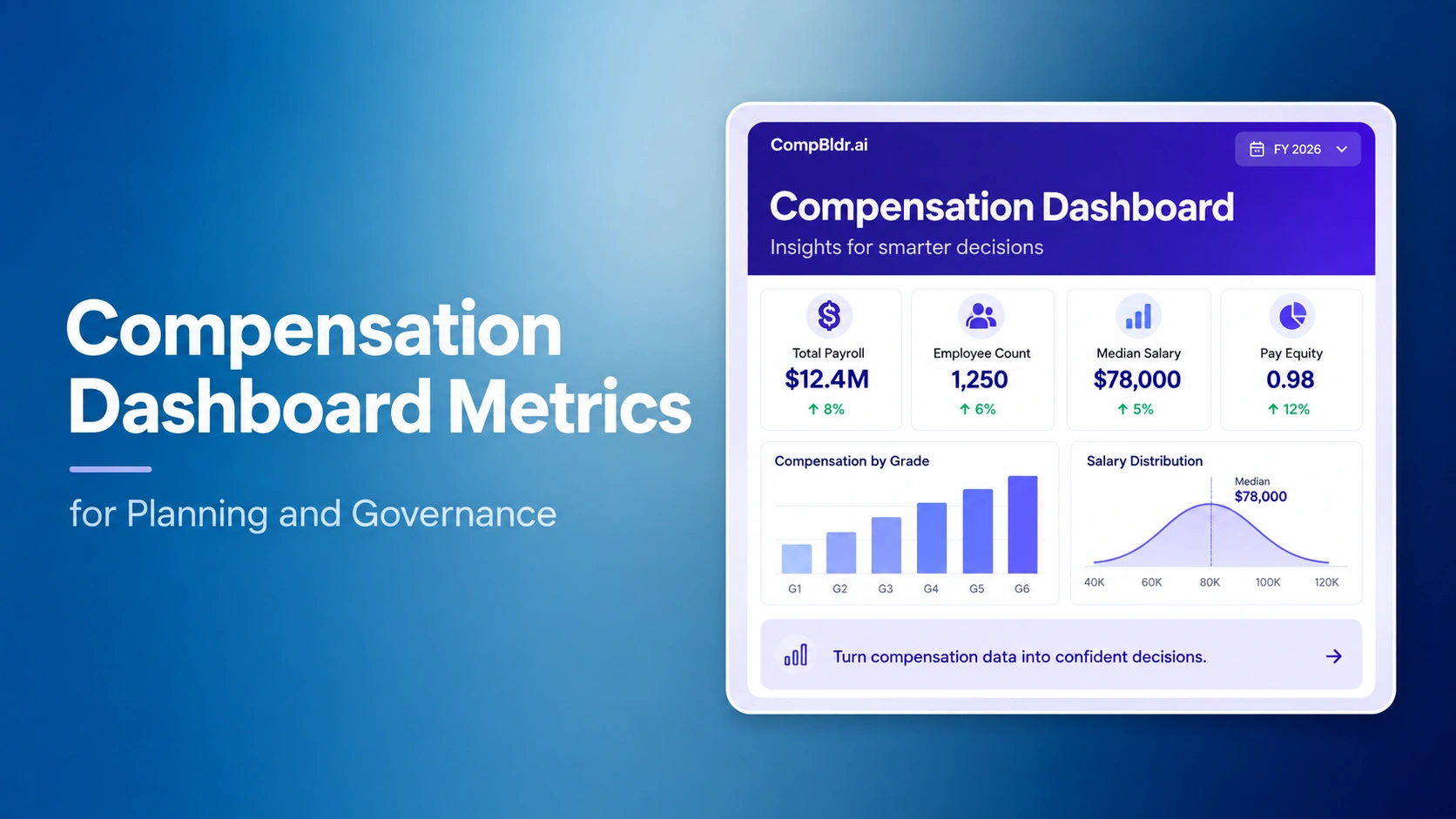
A compensation analytics dashboard is a live reporting interface that consolidates compensation data from your HRIS, compensation governance platform, and market benchmarking sources into a single view for HR, Finance, and executive leadership. It tracks real-time metrics including compa-ratio distribution, pay equity gaps, merit budget consumption, market competitiveness by job family, salary band position distribution, headcount cost forecast, and total compensation spend by department. Unlike periodic reports, a compensation analytics dashboard updates continuously so CHROs and Finance teams can make compensation decisions on current data rather than last quarter's output.

Why Most Compensation Dashboards Fail CHROs and Finance Leaders

Most organizations have compensation data. What they lack is a compensation analytics dashboard that makes that data usable at the moment a decision requires it. Three structural problems explain why most compensation dashboards fail to serve their intended audience.

HR and Finance see different data from different systems

HR pulls compensation data from the HRIS. Finance pulls total compensation cost from the ERP or financial planning system. The two datasets rarely agree on timing, categorization, or completeness. When the CHRO presents a compensation report in an executive meeting and the CFO's numbers differ, the discussion stops being about compensation strategy and starts being about which system is right. A compensation analytics dashboard eliminates this problem by serving a single, reconciled view to both functions from one source of truth.

Lagging metrics arrive after the budget has already been spent

A compensation report produced four weeks after the merit cycle closes tells Finance what was spent and HR what the distribution looked like. It does not help either function intervene before a budget overrun occurs, catch a pay equity pattern before increases are communicated, or adjust a market competitiveness gap before the next recruiting cycle opens. Useful compensation analytics is real-time. The moment a manager submits a merit proposal, the dashboard should update. The moment TrAI detects an equity pattern, it should flag. Post-cycle reporting is documentation. Live analytics is governance.

No connection between individual metrics and compensation decisions

A dashboard that shows 20 metrics with no clear hierarchy of decision-making priority becomes a report rather than a governance tool. The CHRO does not need to see every compensation data point available. They need to see the eight metrics that signal whether the organization's compensation is working: competitive enough to retain talent, equitable enough to satisfy regulatory requirements, affordable enough to meet financial targets, and governed well enough to survive an audit. That is a specific set of metrics, not a comprehensive data export.

LIVE COMPENSATION ANALYTICS

CompBldr's Compensation Analytics module surfaces all eight metrics in a single live dashboard connected to your HRIS. See how CHROs and Finance teams use it to govern compensation decisions in real time.

Book a Demo

The 8 Metrics That Belong in a Compensation Analytics Dashboard

The eight metrics below are organized around their governance function: what each metric tells you, why it must be live rather than periodic, and what decision it enables. They are not the only compensation metrics an organization tracks, but they are the ones that determine whether the CHRO and Finance team can govern compensation together rather than separately.

Metric 1: Compa-Ratio Distribution by Grade

Compa-ratio measures each employee's current salary as a percentage of their salary band midpoint. A compa-ratio of 1.0 means the employee is paid exactly at midpoint. Below 0.90 signals potential underpayment and flight risk for high performers. Above 1.10 signals potential overpayment and compression risk for the grade.

In a compensation analytics dashboard, compa-ratio should appear as a distribution across the four zones (below 80%, 80 to 90%, 90 to 110%, above 110%) segmented by grade. This view tells the CHRO whether salary bands are functioning as designed or whether drift has accumulated over multiple merit cycles. It tells Finance where structural equity adjustment budget is likely needed before the next cycle opens.

This metric must be live because compa-ratio changes every time a salary change is processed. A quarterly snapshot misses the drift that accumulates between cycle close and cycle open.

Compa-ratio distribution chart in CompBldr showing employee percentages across four pay zones by grade, color-coded by flight risk level

Metric 2: Pay Equity Gap by Demographic and Grade

Pay equity gap measures the percentage difference in average or median compensation between demographic groups within the same grade, after controlling for legitimate factors such as tenure, performance rating, and geographic location. An unadjusted gap reflects the raw difference in pay between groups. An adjusted gap reflects the difference that remains after accounting for these factors. Both are legally relevant under EEOC, California Civil Rights Department, and OFCCP guidelines.

In a dashboard, the pay equity gap should display both the unadjusted and adjusted figures by grade and by demographic dimension. The governance value is not in having the number; it is in having the number before a regulatory inquiry surfaces it, and before the merit cycle closes rather than after.

Metric 3: Merit Budget Consumed vs Planned (Real-Time)

During an active merit cycle, the most operationally critical metric is budget consumption against the approved budget. As managers submit proposals, the total cost of approved and pending increases accumulates. A dashboard that updates this figure in real time allows HR and Finance to see budget trajectory before the cycle closes. If a department is tracking toward 115% of its approved allocation by the third week of a four-week submission window, Finance can intervene before the cycle closes rather than reconcile the overrun after.

This is categorically different from a merit cycle summary report. A summary report tells you what was spent. Real-time budget consumption tells you what will be spent if current submission patterns continue, which is the number that enables intervention.

Metric 4: Market Competitiveness by Job Family

Market competitiveness measures how current salary band midpoints compare to the external market reference point (typically the 50th percentile of the relevant compensation survey) for each job family. A competitiveness ratio below 0.90 means the salary band midpoint for that family is more than 10% below the current market, which signals that employees in that family are structurally underpaid relative to the market and at higher flight risk.

In a dashboard, market competitiveness should display as a heat map or ranked table by job family, showing which families are competitive, which are approaching risk thresholds, and which require an off-cycle band review. This metric is most valuable when segmented by job family rather than shown as a single organization-wide average, because market movement is not uniform across functions. AI engineering and machine learning roles may have moved 20% in 18 months while administrative functions remain stable.

Metric 5: Salary Band Position Distribution

Salary band position distribution shows how many employees in each grade are in the lower third of their band, the middle third, or the upper third. This is distinct from compa-ratio distribution: compa-ratio shows position relative to the midpoint, while band position distribution shows concentration within the band's full range. An organization where 70% of employees are in the lower third of their grade band has a structural problem that will not be solved with a standard merit cycle. The employees will remain in the lower third after a 3.5% merit increase because the budget is insufficient to move them materially toward midpoint.

Finance teams use band position distribution for headcount cost modeling. A workforce concentrated in the lower third has significant future salary spend embedded in career progression that a flat workforce model understates.

Metric 6: Headcount Compensation Cost Forecast

Headcount compensation cost forecast projects total compensation spend 12 months forward based on current headcount, approved salary changes, open requisitions, and planned attrition. This is the metric that bridges HR analytics and FP&A. Finance needs this number for annual operating plan construction. HR needs it to demonstrate the cost impact of compensation decisions in business terms rather than HR terms.

A dashboard that surfaces a 12-month compensation cost forecast connected to live HRIS headcount data eliminates the manual modeling exercise that typically consumes weeks of HR and Finance collaboration at the start of planning season. It also enables what-if analysis: if the merit budget is increased from 3.5% to 4.2%, what is the incremental annual cost?

Metric 7: TrAI Equity Flag Count and Escalation Status

TrAI is CompBldr's AI engine that monitors merit cycle proposals in real time and flags compensation patterns that signal potential equity risk: compa-ratio gaps within grade clusters, flat-rate submission patterns, and systematic demographic pay differences after controlling for legitimate factors. The TrAI flag count is the number of active equity flags requiring HR review, segmented by severity (informational, review recommended, escalation required) and by whether they have been acknowledged, resolved, or escalated.

No competitor compensation analytics dashboard includes a real-time AI equity flag count as a dashboard metric. Every other platform surfaces equity findings through post-cycle reporting or annual audit processes. TrAI surfaces the pattern during the cycle, when a correction is a straightforward proposal adjustment rather than a retroactive off-cycle equity program. For CHROs who need to demonstrate proactive pay equity governance to their board, the TrAI flag count is the metric that shows the organization is not waiting for annual audits to find problems.

Metric 8: Year-Over-Year Total Compensation Spend by Department

Total compensation spend by department, tracked year-over-year, connects compensation decisions to business unit performance in the language Finance understands. It shows whether compensation spend is growing proportionally with headcount and revenue, or whether a specific department is experiencing structural cost growth that exceeds business performance. For the CFO preparing for a board compensation committee presentation, this is the metric that contextualizes merit cycle cost within the broader financial picture.

This metric is most valuable when it separates base salary spend from variable pay spend by department, because the two have different cost dynamics and different explanations. Engineering base salary growth reflects market movement. Sales variable pay growth reflects revenue performance. Conflating them produces a number that neither HR nor Finance can explain clearly.

TrAI pay equity flag dashboard in CompBldr showing mid-cycle equity alerts by grade cluster with demographic gap percentage, affected employee count, and escalation status for HR review before cycle close

ONE DASHBOARD FOR EVERY STAKEHOLDER

Your board compensation committee needs a quarterly summary. Your CFO needs a 12-month cost forecast. Your CHRO needs real-time equity flags. CompBldr delivers all three from the same live dashboard. Book a 15-minute demo to see all 8 compensation metrics in one view.

Book a Demo
```

How to Use These Metrics Together: The Governance View vs the Finance View

The same eight metrics read differently depending on the reader's decision-making responsibility. Presenting identical dashboards to the CHRO and the CFO is less effective than presenting the same data organized around their respective priorities.

What the CHRO reads

The CHRO reads the dashboard for governance signals: Is pay equity trending in the right direction? Are TrAI equity flags being resolved before they accumulate into regulatory exposure? Are salary bands competitive enough to support the talent acquisition pipeline? Is the merit budget being consumed in a way that is differentiated by performance and pay position, or is the distribution flat? The CHRO's primary concern is whether compensation decisions are equitable, consistent, and defensible.

What the Finance team reads

Finance reads the same dashboard for cost governance signals: Is the merit cycle on track against the approved budget? Is the total compensation cost forecast within the operating plan? Are any departments trending toward cost growth that exceeds revenue contribution? Is compensation-as-a-percent-of-revenue moving in a sustainable direction? Finance's primary concern is whether compensation spend is predictable, controlled, and connected to business performance.

What the board compensation committee receives

The board compensation committee receives a quarterly summary drawn from the dashboard: executive pay ratio, total compensation spend year-over-year, pay equity gap summary, market competitiveness status by job family cluster, and TrAI equity flag resolution rate. The board needs to be satisfied that compensation is governed responsibly, not that it is detailed exhaustively. A two-page summary derived from the live dashboard, produced on a quarterly cadence, is what most boards require and what most HR teams cannot currently produce without a multi-week manual assembly process.

What Separates a Compensation Analytics Dashboard from a Comp Report

Comparison Criteria Compensation Report Compensation Analytics Dashboard
Update frequency Quarterly or monthly Live, updated with every transaction
Primary use Documentation and review Real-time decision support
Merit cycle relevance Post-cycle summary Live budget consumption during the cycle
Pay equity timing Annual or post-cycle Mid-cycle flags via TrAI
Finance integration Separate FP&A model 12-month cost forecast in the same view
Board delivery Compiled manually Quarterly summary from live data

Common Mistakes When Building a Compensation Analytics Dashboard

Organizations that attempt to build compensation analytics dashboards in BI tools or HRIS native reporting modules typically encounter five structural problems.

  • Too many metrics: A dashboard with 30 metrics provides no decision hierarchy. The eight metrics above are sufficient for C-suite governance. Additional metrics belong in analyst-level drill-down views, not the executive dashboard.
  • Mixing data freshness: A dashboard that pulls compa-ratio from a weekly HRIS export and merit budget from a daily compensation system report will show inconsistent numbers. Every metric in an executive dashboard should draw from the same source at the same refresh frequency.
  • Treating equity analysis as a periodic exercise: Pay equity analysis run annually or post-cycle finds problems that are expensive to correct. Real-time equity monitoring during the merit cycle, as TrAI provides, finds the same problems at a fraction of the remediation cost.
  • No CHRO versus Finance view separation: Presenting the same raw data interface to the CHRO and the CFO without organizing it around their respective decision responsibilities produces a dashboard that neither uses consistently.
  • Building in a BI tool rather than a compensation platform: Building a compensation analytics dashboard in Tableau or Power BI requires manual data pipeline maintenance, does not provide real-time merit cycle tracking, and cannot generate TrAI-equivalent mid-cycle equity flags. BI tools visualize historical data. A compensation analytics platform provides live governance.

How CompBldr Delivers All 8 Metrics in One View

CompBldr's Compensation Analytics module is connected directly to the compensation governance platform rather than ingesting data from external exports. This means every metric reflects the current state of compensation data without a data pipeline delay.

Compa-ratio distribution updates when a salary change is processed in the HRIS and syncs to CompBldr. Merit budget consumption updates in real time as managers submit proposals during the active cycle. TrAI equity flag count updates as the AI engine processes each proposal against the grade cluster's demographic distribution. Market competitiveness updates when Radford, Mercer, or WTW benchmarking data is refreshed and when CompBldr recalculates salary band midpoints against current survey data.

All eight metrics are available in the same interface. The CHRO view and the Finance view are separate dashboard configurations drawing from the same underlying data, so both functions always see the same numbers in the format most relevant to their decisions. The board compensation committee quarterly summary is a report generated from the live dashboard, not assembled from separate data sources.

A compensation analytics dashboard that serves both the CHRO and Finance team requires exactly eight live metrics: compa-ratio distribution, pay equity gap, real-time merit budget consumption, market competitiveness by job family, salary band position distribution, headcount cost forecast, TrAI equity flag count, and year-over-year total compensation spend by department.

The difference between a compensation dashboard and a set of compensation reports is not the metrics themselves but the timing and decision connectivity. Reports document what happened. A live dashboard enables decisions about what is happening. For organizations managing active merit cycles, evolving pay transparency obligations, and board-level scrutiny of compensation governance, the distinction is not academic. It determines whether compensation decisions are made on current information or on last quarter's summary.

The practical next step is to audit your current compensation data infrastructure against the eight metrics above. Which of the eight does your team have access to in real time? Which require a manual assembly process? Which are only available post-cycle? The gaps between your current state and the eight-metric standard are the governance gaps that CompBldr is built to close.

LIVE COMPENSATION ANALYTICS

One Dashboard, Eight Compensation Metrics

CompBldr's dashboard tracks 8 compensation metrics compa-ratio, pay equity, merit budget, market competitiveness, band distribution, headcount cost forecast, equity flags, and YoY spend giving CHROs and Finance a shared view without manual reports.

Book a Demo

KEY TAKEAWAYS

  • A compensation analytics dashboard that works for both the CHRO and Finance team requires exactly 8 metrics, not a generic list of 20 data points that nobody checks.
  • Most dashboards fail because HR and Finance pull from different systems, metrics arrive too late to act on, and there is no live view of budget consumption during the merit cycle.
  • Compa-ratio distribution, real-time merit budget vs actuals, and TrAI equity flag count are the three metrics most compensation teams lack but need most urgently.
  • The CHRO reads the dashboard for governance signals. Finance reads it for cost control. The board compensation committee needs a quarterly summary that draws from both views.
  • CompBldr delivers all 8 metrics in a single live dashboard connected to your HRIS- no spreadsheet reconciliation, no quarterly report assembly, no BI tool configuration required.

Ask a CHRO how their team is tracking compensation analytics, and you will typically hear one of two answers. Either they have a collection of reports that Finance produces quarterly, or they have a set of HRIS exports that HR assembles manually before the board meeting. Neither is a dashboard. Neither is live. And neither tells the CHRO and Finance team what they need to know at the moment a compensation decision has to be made.

A compensation analytics dashboard is not a collection of reports scheduled for monthly delivery. It is a live governance tool that surfaces the eight metrics that determine whether your pay decisions are competitive, equitable, sustainable, and defensible. When those eight metrics are in a single view, the CHRO and CFO can govern compensation together. When they are not, they are each working from a partial picture at different times with different data.

This article defines exactly which eight metrics belong in a compensation analytics dashboard, explains why each one requires live data rather than periodic reporting, and describes how the CHRO and Finance team should read the same dashboard differently based on their decision-making responsibilities.

What Is a Compensation Analytics Dashboard?

A compensation analytics dashboard is a live reporting interface that consolidates compensation data from your HRIS, compensation governance platform, and market benchmarking sources into a single view for HR, Finance, and executive leadership. It tracks real-time metrics including compa-ratio distribution, pay equity gaps, merit budget consumption, market competitiveness by job family, salary band position distribution, headcount cost forecast, and total compensation spend by department. Unlike periodic reports, a compensation analytics dashboard updates continuously so CHROs and Finance teams can make compensation decisions on current data rather than last quarter's output.

Why Most Compensation Dashboards Fail CHROs and Finance Leaders

Most organizations have compensation data. What they lack is a compensation analytics dashboard that makes that data usable at the moment a decision requires it. Three structural problems explain why most compensation dashboards fail to serve their intended audience.

HR and Finance see different data from different systems

HR pulls compensation data from the HRIS. Finance pulls total compensation cost from the ERP or financial planning system. The two datasets rarely agree on timing, categorization, or completeness. When the CHRO presents a compensation report in an executive meeting and the CFO's numbers differ, the discussion stops being about compensation strategy and starts being about which system is right. A compensation analytics dashboard eliminates this problem by serving a single, reconciled view to both functions from one source of truth.

Lagging metrics arrive after the budget has already been spent

A compensation report produced four weeks after the merit cycle closes tells Finance what was spent and HR what the distribution looked like. It does not help either function intervene before a budget overrun occurs, catch a pay equity pattern before increases are communicated, or adjust a market competitiveness gap before the next recruiting cycle opens. Useful compensation analytics is real-time. The moment a manager submits a merit proposal, the dashboard should update. The moment TrAI detects an equity pattern, it should flag. Post-cycle reporting is documentation. Live analytics is governance.

No connection between individual metrics and compensation decisions

A dashboard that shows 20 metrics with no clear hierarchy of decision-making priority becomes a report rather than a governance tool. The CHRO does not need to see every compensation data point available. They need to see the eight metrics that signal whether the organization's compensation is working: competitive enough to retain talent, equitable enough to satisfy regulatory requirements, affordable enough to meet financial targets, and governed well enough to survive an audit. That is a specific set of metrics, not a comprehensive data export.

LIVE COMPENSATION ANALYTICS

CompBldr's Compensation Analytics module surfaces all eight metrics in a single live dashboard connected to your HRIS. See how CHROs and Finance teams use it to govern compensation decisions in real time.

Book a Demo

The 8 Metrics That Belong in a Compensation Analytics Dashboard

The eight metrics below are organized around their governance function: what each metric tells you, why it must be live rather than periodic, and what decision it enables. They are not the only compensation metrics an organization tracks, but they are the ones that determine whether the CHRO and Finance team can govern compensation together rather than separately.

Metric 1: Compa-Ratio Distribution by Grade

Compa-ratio measures each employee's current salary as a percentage of their salary band midpoint. A compa-ratio of 1.0 means the employee is paid exactly at midpoint. Below 0.90 signals potential underpayment and flight risk for high performers. Above 1.10 signals potential overpayment and compression risk for the grade.

In a compensation analytics dashboard, compa-ratio should appear as a distribution across the four zones (below 80%, 80 to 90%, 90 to 110%, above 110%) segmented by grade. This view tells the CHRO whether salary bands are functioning as designed or whether drift has accumulated over multiple merit cycles. It tells Finance where structural equity adjustment budget is likely needed before the next cycle opens.

This metric must be live because compa-ratio changes every time a salary change is processed. A quarterly snapshot misses the drift that accumulates between cycle close and cycle open.

Compa-ratio distribution chart in CompBldr showing employee percentages across four pay zones by grade, color-coded by flight risk level

Metric 2: Pay Equity Gap by Demographic and Grade

Pay equity gap measures the percentage difference in average or median compensation between demographic groups within the same grade, after controlling for legitimate factors such as tenure, performance rating, and geographic location. An unadjusted gap reflects the raw difference in pay between groups. An adjusted gap reflects the difference that remains after accounting for these factors. Both are legally relevant under EEOC, California Civil Rights Department, and OFCCP guidelines.

In a dashboard, the pay equity gap should display both the unadjusted and adjusted figures by grade and by demographic dimension. The governance value is not in having the number; it is in having the number before a regulatory inquiry surfaces it, and before the merit cycle closes rather than after.

Metric 3: Merit Budget Consumed vs Planned (Real-Time)

During an active merit cycle, the most operationally critical metric is budget consumption against the approved budget. As managers submit proposals, the total cost of approved and pending increases accumulates. A dashboard that updates this figure in real time allows HR and Finance to see budget trajectory before the cycle closes. If a department is tracking toward 115% of its approved allocation by the third week of a four-week submission window, Finance can intervene before the cycle closes rather than reconcile the overrun after.

This is categorically different from a merit cycle summary report. A summary report tells you what was spent. Real-time budget consumption tells you what will be spent if current submission patterns continue, which is the number that enables intervention.

Metric 4: Market Competitiveness by Job Family

Market competitiveness measures how current salary band midpoints compare to the external market reference point (typically the 50th percentile of the relevant compensation survey) for each job family. A competitiveness ratio below 0.90 means the salary band midpoint for that family is more than 10% below the current market, which signals that employees in that family are structurally underpaid relative to the market and at higher flight risk.

In a dashboard, market competitiveness should display as a heat map or ranked table by job family, showing which families are competitive, which are approaching risk thresholds, and which require an off-cycle band review. This metric is most valuable when segmented by job family rather than shown as a single organization-wide average, because market movement is not uniform across functions. AI engineering and machine learning roles may have moved 20% in 18 months while administrative functions remain stable.

Metric 5: Salary Band Position Distribution

Salary band position distribution shows how many employees in each grade are in the lower third of their band, the middle third, or the upper third. This is distinct from compa-ratio distribution: compa-ratio shows position relative to the midpoint, while band position distribution shows concentration within the band's full range. An organization where 70% of employees are in the lower third of their grade band has a structural problem that will not be solved with a standard merit cycle. The employees will remain in the lower third after a 3.5% merit increase because the budget is insufficient to move them materially toward midpoint.

Finance teams use band position distribution for headcount cost modeling. A workforce concentrated in the lower third has significant future salary spend embedded in career progression that a flat workforce model understates.

Metric 6: Headcount Compensation Cost Forecast

Headcount compensation cost forecast projects total compensation spend 12 months forward based on current headcount, approved salary changes, open requisitions, and planned attrition. This is the metric that bridges HR analytics and FP&A. Finance needs this number for annual operating plan construction. HR needs it to demonstrate the cost impact of compensation decisions in business terms rather than HR terms.

A dashboard that surfaces a 12-month compensation cost forecast connected to live HRIS headcount data eliminates the manual modeling exercise that typically consumes weeks of HR and Finance collaboration at the start of planning season. It also enables what-if analysis: if the merit budget is increased from 3.5% to 4.2%, what is the incremental annual cost?

Metric 7: TrAI Equity Flag Count and Escalation Status

TrAI is CompBldr's AI engine that monitors merit cycle proposals in real time and flags compensation patterns that signal potential equity risk: compa-ratio gaps within grade clusters, flat-rate submission patterns, and systematic demographic pay differences after controlling for legitimate factors. The TrAI flag count is the number of active equity flags requiring HR review, segmented by severity (informational, review recommended, escalation required) and by whether they have been acknowledged, resolved, or escalated.

No competitor compensation analytics dashboard includes a real-time AI equity flag count as a dashboard metric. Every other platform surfaces equity findings through post-cycle reporting or annual audit processes. TrAI surfaces the pattern during the cycle, when a correction is a straightforward proposal adjustment rather than a retroactive off-cycle equity program. For CHROs who need to demonstrate proactive pay equity governance to their board, the TrAI flag count is the metric that shows the organization is not waiting for annual audits to find problems.

Metric 8: Year-Over-Year Total Compensation Spend by Department

Total compensation spend by department, tracked year-over-year, connects compensation decisions to business unit performance in the language Finance understands. It shows whether compensation spend is growing proportionally with headcount and revenue, or whether a specific department is experiencing structural cost growth that exceeds business performance. For the CFO preparing for a board compensation committee presentation, this is the metric that contextualizes merit cycle cost within the broader financial picture.

This metric is most valuable when it separates base salary spend from variable pay spend by department, because the two have different cost dynamics and different explanations. Engineering base salary growth reflects market movement. Sales variable pay growth reflects revenue performance. Conflating them produces a number that neither HR nor Finance can explain clearly.

TrAI pay equity flag dashboard in CompBldr showing mid-cycle equity alerts by grade cluster with demographic gap percentage, affected employee count, and escalation status for HR review before cycle close

ONE DASHBOARD FOR EVERY STAKEHOLDER

Your board compensation committee needs a quarterly summary. Your CFO needs a 12-month cost forecast. Your CHRO needs real-time equity flags. CompBldr delivers all three from the same live dashboard. Book a 15-minute demo to see all 8 compensation metrics in one view.

Book a Demo
```

How to Use These Metrics Together: The Governance View vs the Finance View

The same eight metrics read differently depending on the reader's decision-making responsibility. Presenting identical dashboards to the CHRO and the CFO is less effective than presenting the same data organized around their respective priorities.

What the CHRO reads

The CHRO reads the dashboard for governance signals: Is pay equity trending in the right direction? Are TrAI equity flags being resolved before they accumulate into regulatory exposure? Are salary bands competitive enough to support the talent acquisition pipeline? Is the merit budget being consumed in a way that is differentiated by performance and pay position, or is the distribution flat? The CHRO's primary concern is whether compensation decisions are equitable, consistent, and defensible.

What the Finance team reads

Finance reads the same dashboard for cost governance signals: Is the merit cycle on track against the approved budget? Is the total compensation cost forecast within the operating plan? Are any departments trending toward cost growth that exceeds revenue contribution? Is compensation-as-a-percent-of-revenue moving in a sustainable direction? Finance's primary concern is whether compensation spend is predictable, controlled, and connected to business performance.

What the board compensation committee receives

The board compensation committee receives a quarterly summary drawn from the dashboard: executive pay ratio, total compensation spend year-over-year, pay equity gap summary, market competitiveness status by job family cluster, and TrAI equity flag resolution rate. The board needs to be satisfied that compensation is governed responsibly, not that it is detailed exhaustively. A two-page summary derived from the live dashboard, produced on a quarterly cadence, is what most boards require and what most HR teams cannot currently produce without a multi-week manual assembly process.

What Separates a Compensation Analytics Dashboard from a Comp Report

Comparison Criteria Compensation Report Compensation Analytics Dashboard
Update frequency Quarterly or monthly Live, updated with every transaction
Primary use Documentation and review Real-time decision support
Merit cycle relevance Post-cycle summary Live budget consumption during the cycle
Pay equity timing Annual or post-cycle Mid-cycle flags via TrAI
Finance integration Separate FP&A model 12-month cost forecast in the same view
Board delivery Compiled manually Quarterly summary from live data

Common Mistakes When Building a Compensation Analytics Dashboard

Organizations that attempt to build compensation analytics dashboards in BI tools or HRIS native reporting modules typically encounter five structural problems.

  • Too many metrics: A dashboard with 30 metrics provides no decision hierarchy. The eight metrics above are sufficient for C-suite governance. Additional metrics belong in analyst-level drill-down views, not the executive dashboard.
  • Mixing data freshness: A dashboard that pulls compa-ratio from a weekly HRIS export and merit budget from a daily compensation system report will show inconsistent numbers. Every metric in an executive dashboard should draw from the same source at the same refresh frequency.
  • Treating equity analysis as a periodic exercise: Pay equity analysis run annually or post-cycle finds problems that are expensive to correct. Real-time equity monitoring during the merit cycle, as TrAI provides, finds the same problems at a fraction of the remediation cost.
  • No CHRO versus Finance view separation: Presenting the same raw data interface to the CHRO and the CFO without organizing it around their respective decision responsibilities produces a dashboard that neither uses consistently.
  • Building in a BI tool rather than a compensation platform: Building a compensation analytics dashboard in Tableau or Power BI requires manual data pipeline maintenance, does not provide real-time merit cycle tracking, and cannot generate TrAI-equivalent mid-cycle equity flags. BI tools visualize historical data. A compensation analytics platform provides live governance.

How CompBldr Delivers All 8 Metrics in One View

CompBldr's Compensation Analytics module is connected directly to the compensation governance platform rather than ingesting data from external exports. This means every metric reflects the current state of compensation data without a data pipeline delay.

Compa-ratio distribution updates when a salary change is processed in the HRIS and syncs to CompBldr. Merit budget consumption updates in real time as managers submit proposals during the active cycle. TrAI equity flag count updates as the AI engine processes each proposal against the grade cluster's demographic distribution. Market competitiveness updates when Radford, Mercer, or WTW benchmarking data is refreshed and when CompBldr recalculates salary band midpoints against current survey data.

All eight metrics are available in the same interface. The CHRO view and the Finance view are separate dashboard configurations drawing from the same underlying data, so both functions always see the same numbers in the format most relevant to their decisions. The board compensation committee quarterly summary is a report generated from the live dashboard, not assembled from separate data sources.

A compensation analytics dashboard that serves both the CHRO and Finance team requires exactly eight live metrics: compa-ratio distribution, pay equity gap, real-time merit budget consumption, market competitiveness by job family, salary band position distribution, headcount cost forecast, TrAI equity flag count, and year-over-year total compensation spend by department.

The difference between a compensation dashboard and a set of compensation reports is not the metrics themselves but the timing and decision connectivity. Reports document what happened. A live dashboard enables decisions about what is happening. For organizations managing active merit cycles, evolving pay transparency obligations, and board-level scrutiny of compensation governance, the distinction is not academic. It determines whether compensation decisions are made on current information or on last quarter's summary.

The practical next step is to audit your current compensation data infrastructure against the eight metrics above. Which of the eight does your team have access to in real time? Which require a manual assembly process? Which are only available post-cycle? The gaps between your current state and the eight-metric standard are the governance gaps that CompBldr is built to close.

LIVE COMPENSATION ANALYTICS

One Dashboard, Eight Compensation Metrics

CompBldr's dashboard tracks 8 compensation metrics compa-ratio, pay equity, merit budget, market competitiveness, band distribution, headcount cost forecast, equity flags, and YoY spend giving CHROs and Finance a shared view without manual reports.

Book a Demo
Frequently Asked Questions