Multi-Location Pay Planning

Compensation Management Software for Retail

CompBldr helps retail compensation teams compare pay across stores, manage market-based salary bands, and review merit increases against district budgets.

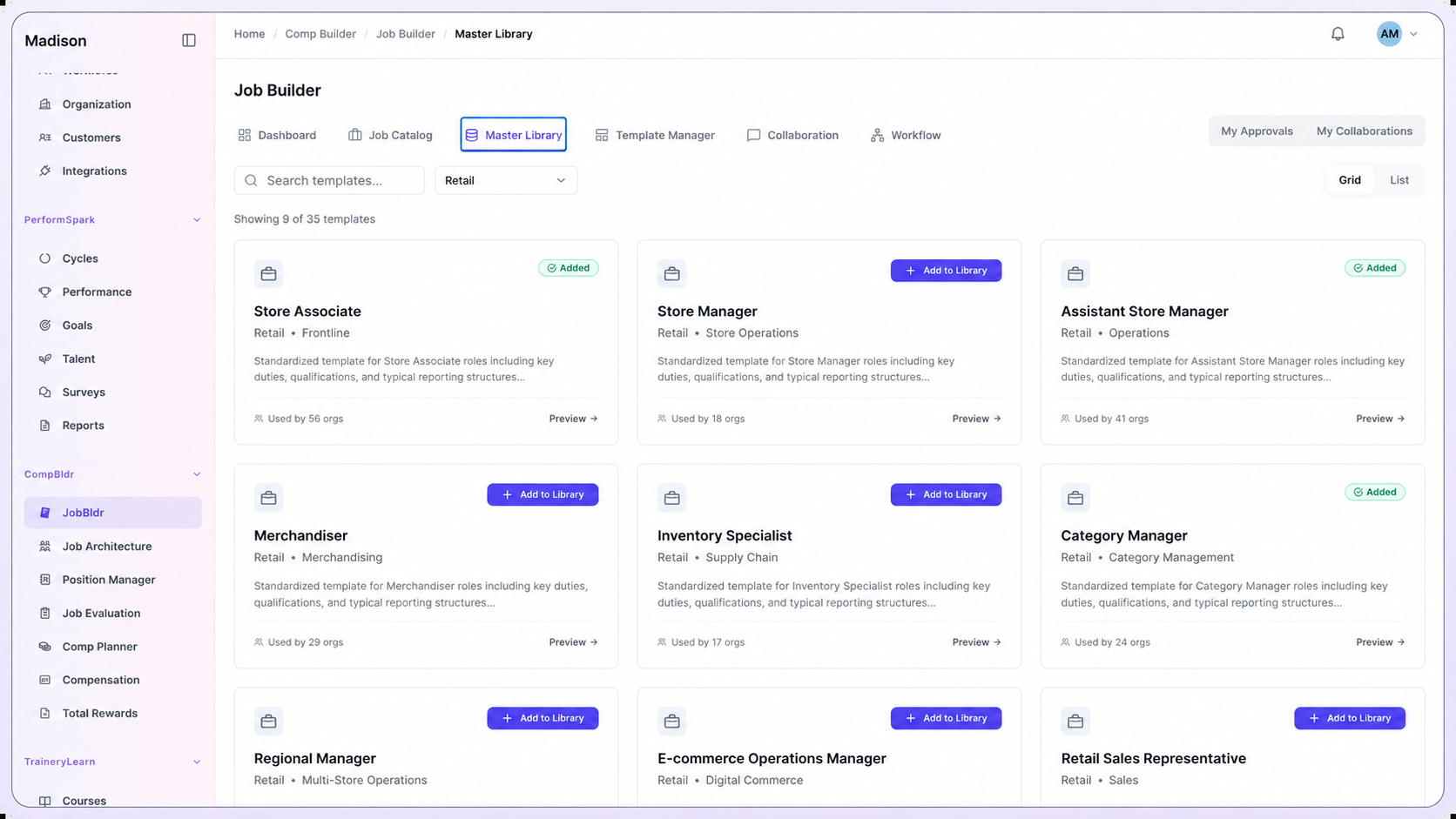
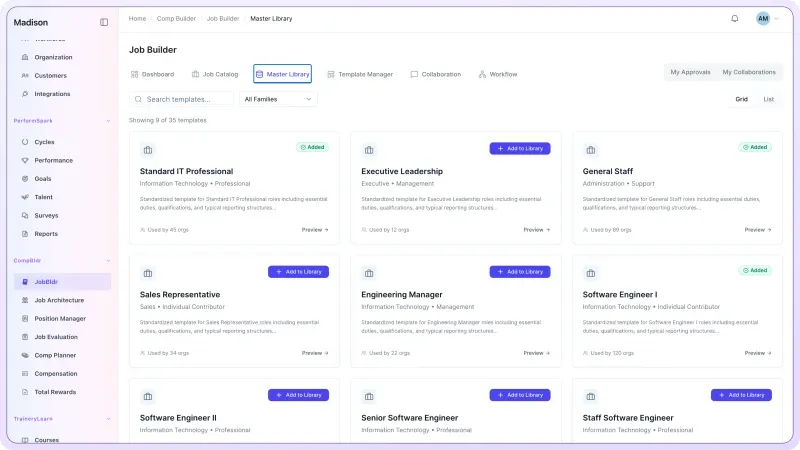
CompBldr retail job template library showing store associates, store managers, merchandising and inventory roles.
Retail Compensation Challenges

Why Retail Compensation Gets Complex

A chain can use one job architecture while its locations compete in different labor markets. The hard part is deciding which differences reflect the job, which reflect geography, and which need review before an offer or merit decision.

  • Compare job scope across store formats before assigning grades.
  • Keep job grades consistent and adjust pay ranges for local markets.
  • Benchmark hourly and salaried roles separately against comparable jobs.
  • Compare new-hire offers with current employee pay in the same role and market.
Retail Pay Workspace
Job Architecture

Store Operations

JobJob FamilyGrade
Sales AssociateStore SalesR1
Store SupervisorStore OperationsR2
Store ManagerStore LeadershipR3

Manage Pay Across Store Locations

Compare job levels, local pay ranges, and proposed increases across stores in one compensation workflow.
Connected Workflow

One Connected Compensation Workflow

Connect job descriptions, evaluation, benchmarks, pay ranges, compensation plans, and reward communication across stores, distribution teams, and headquarters.

Start with the approved job record

Document the scope of cashiers, department leads, store managers, and merchandising analysts

Review and version job descriptions for stores, distribution teams, and headquarters before teams grade or price the roles.

✓Capture the details that affect scope. Staffing responsibility, store complexity, reporting line, and decision authority.
✓Update the approved record when responsibilities or operating scope change.
✓Carry the approved role record into downstream compensation work.
Explore Job Description
CompBldr JobBldr Master Library dashboard showing standardized job description templates.
Build a shared job and grade structure

Map comparable roles across stores, distribution teams, and headquarters

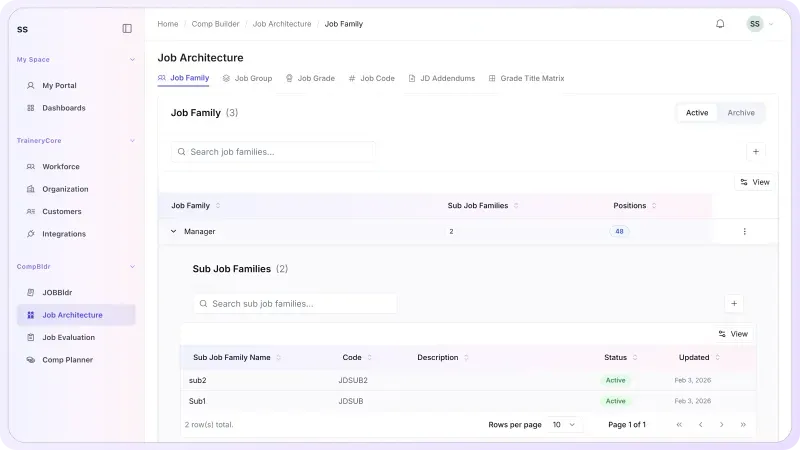
Use Job Architecture to organize roles into job families, levels, grades, and codes. Retain local differences where they reflect a genuinely different job.

✓Calibrate role titles and levels across stores, distribution teams, and headquarters.
✓Clarify progression within specialist, supervisory, and leadership tracks.
✓Keep job structure connected to grades, market data, and salary structures.
Explore Job Architecture
CompBldr Job Architecture dashboard showing job families and classification hierarchy.
Evaluate role scope before market pricing

Document job value across stores, distribution teams, and headquarters

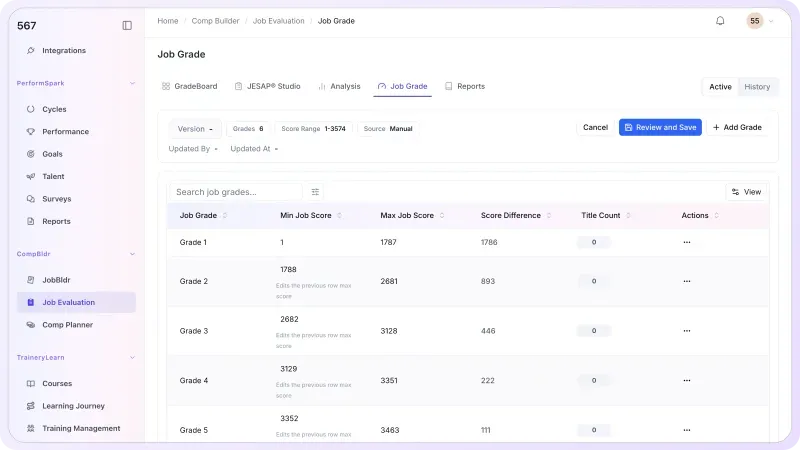
Use Job Evaluation to apply a consistent process, document grade decisions, and preserve the reasoning behind role value before external benchmarking.

✓Evaluate roles on job requirements and decision scope. Review differences in cashiers, department leads, store managers, and merchandising analysts against the same criteria.
✓Document grade assignments and review history.
✓Give market benchmarking a stronger internal reference point.
Explore Job Evaluation
CompBldr Job Evaluation dashboard showing job grades and point factor ranges.
Benchmark Retail roles in the right market

Review scope, grade, and geography before choosing a survey match

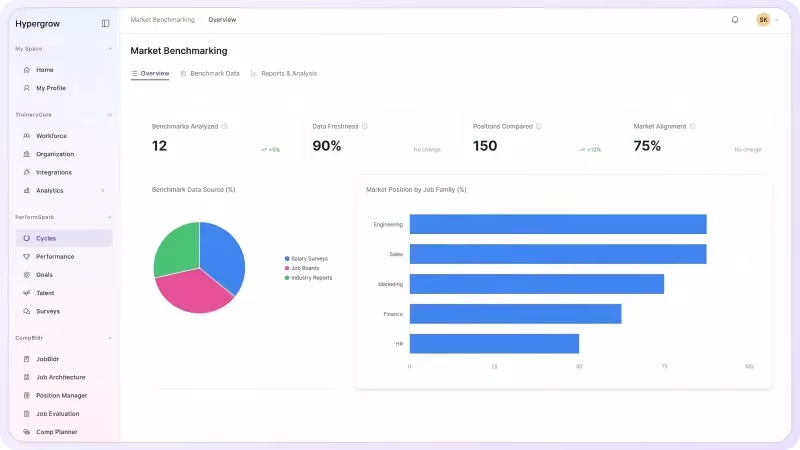
Compare local markets and store formats, and confirm whether the survey rate reflects hourly base pay or salaried base pay.

External market context: The U.S. Bureau of Labor Statistics May 2025 OEWS tables provide wage information by occupation and geography. Use them as broad context, not as a substitute for a job-matched retail salary survey.

✓Use the role record and selected data source to review matches for cashiers, department leads, store managers, and merchandising analysts.
✓Document survey matches, assumptions, and target positioning.
✓Carry approved market context into salary structures and planning.
Explore Market Benchmarking
CompBldr Market Benchmarking dashboard showing compensation market data and pay comparisons.
Turn range and market context into governed pay decisions

Review pay proposals across stores, distribution teams, and headquarters

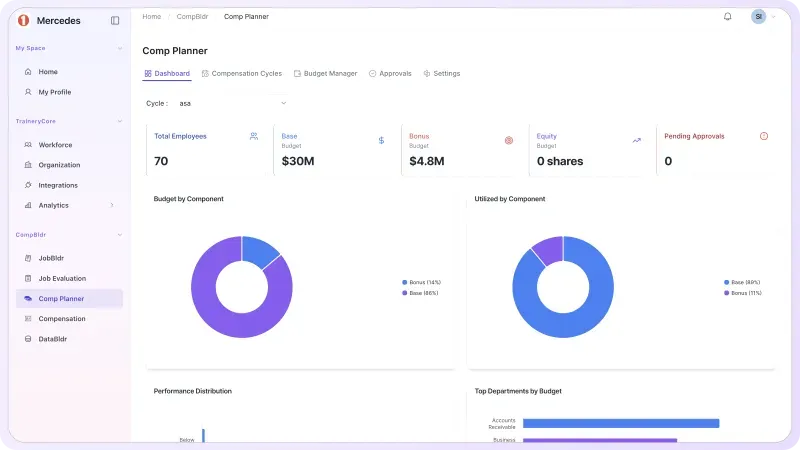
Review district-manager recommendations and compare proposed increases with range position and the district budget.

✓Set eligibility, budgets, and compensation guidelines.
✓Compare manager proposals with approved salary ranges, local-market evidence, and district budgets; flag exceptions for review.
✓Preserve rationale, approvals, and finalized compensation decisions.
Explore Compensation Planning
CompBldr Compensation Planning dashboard showing compensation planning budgets and cycle utilization.
Carry approved outcomes into employee communication

Turn finalized compensation and benefits data into governed total-rewards statements

Use Total Rewards Statements to bring approved compensation and benefits information into employee-facing communication with preview, approval, controlled release, and history.

✓Connect approved compensation outcomes to employee communication.
✓Review statement content before release.
✓Maintain controlled distribution and statement history.
Explore Total Rewards
CompBldr Total Rewards dashboard showing the employee rewards statement editor.
Pay Decisions

Manage the Compensation Decisions Your Team Actually Makes

Use the same job, grade, market, and approval evidence to compare decisions across stores, distribution teams, and headquarters.

Three dark blue stacked diamond shapes with rounded corners, representing layers or levels.

Retail Job Architecture

Calibrate families and grades for cashiers, department leads, store managers, and merchandising analysts. Use the job leveling matrix template to compare level criteria across locations.

Retail Role Benchmarking

Compare local markets and store formats, and confirm whether the survey rate reflects hourly base pay or salaried base pay. The market pricing methodology provides a step-by-step reference.

Salary Structures Across Locations

Connect grades, local market evidence, and salary structures across stores, distribution teams, and headquarters. Use how to build salary bands to review midpoint, minimum, and maximum decisions.

Icon of a user silhouette with a gear symbol next to it, representing user settings or account configuration.

Role Scope and Grade Calibration

When a role expands, use the job evaluation workflow to review the requirements and grade evidence before deciding whether to update the benchmark or the salary range.

Dark blue zigzag line resembling an electrical or heart rate waveform.

Compression & Market Adjustment Review

Review employee pay, market evidence, grade, and range position when pay compression is suspected. Use pay-equity review when broader pay relationships need investigation.

Before & After

Bring Retail Compensation Decisions Into One Workflow

Fragmented Process
Similar jobs get different titles and grades across stores, distribution teams, and headquarters
Benchmark matches are hard to trace back to the approved job
Local range changes and merit exceptions are reviewed separately
Pay compression becomes visible after an offer or cycle is approved
Leaders reconstruct budget and approval decisions from email
With CompBldr
✓ Job scope, family, grade, and location are visible together
✓ Analysts can review the source and reasoning behind the market match
✓ The approved grade and market evidence support each salary structure
✓ Teams review pay position, budget, and exceptions in context
✓ Approval history and finalized decisions are available for reporting

Why CompBldr

Compensation Governance Built Into the Workflow

CompBldr gives Compensation, HR, Finance, and field leaders a shared record across stores, distribution teams, and headquarters.

Connected Compensation Records

Trace the decision from job scope and market match through range, proposal, budget, and approvals.

Human Review & Approvals

Keep reviewer, rationale, approval status, and decision history attached to the compensation workflow.

Versioned Decisions & Reports

Retain previous grades, benchmark decisions, and final pay actions so reviewers can see what changed across stores, distribution teams, and headquarters.

CompensationHR LeadershipFinanceField HRManagersDistrict Leaders

For access controls and platform safeguards, see CompBldr Security.

Retail Buyer FAQs

Can stores share the same job grades while using different pay bands?
Black downward-pointing chevron arrow with rounded ends.

Yes. Use a common job family and grade structure, then review geographic or business-unit differences against approved benchmark evidence and salary structures.

Two overlapping speech bubbles with ellipsis inside, representing a chat or conversation concept.
How should we benchmark a store manager across different formats?
Black downward-pointing chevron arrow with rounded ends.

Compare the size and scope of the operation, staffing responsibility, and decision authority before selecting a survey match. CompBldr retains the internal role, market source, and match rationale for review.

Two overlapping speech bubbles with ellipsis inside, representing a chat or conversation concept.
How can we review hourly and salaried roles together?
Black downward-pointing chevron arrow with rounded ends.

Keep the pay basis visible and compare like with like. When you annualize an hourly rate for analysis, document the assumed hours and keep the source rate available to reviewers.

Two overlapping speech bubbles with ellipsis inside, representing a chat or conversation concept.
Can district managers submit merit recommendations?
Black downward-pointing chevron arrow with rounded ends.

Compensation Planning supports manager recommendations and configurable approvals. Set eligibility, guidelines, and budgets centrally, then review proposed amounts and rationale through the configured workflow.

Two overlapping speech bubbles with ellipsis inside, representing a chat or conversation concept.
How can we spot pay compression between new hires and incumbents?
Black downward-pointing chevron arrow with rounded ends.

Compare base pay, range position, grade, and location for comparable employees. A flagged gap gives Compensation a case to investigate using tenure, role scope, market movement, and documented pay actions.

Two overlapping speech bubbles with ellipsis inside, representing a chat or conversation concept.
Can this replace retail payroll or scheduling?
Black downward-pointing chevron arrow with rounded ends.

Use CompBldr to govern role structure, market pricing, salary bands, pay decisions, and approvals. Use the appropriate payroll and workforce-management systems for time records, scheduling, and wage processing.

Two overlapping speech bubbles with ellipsis inside, representing a chat or conversation concept.
What should we ask to see in a retail demo?
Black downward-pointing chevron arrow with rounded ends.

Bring two stores and one role with a recent offer or merit exception. Ask to trace the role grade, market match, range position, manager proposal, budget impact, and approval record.

Two overlapping speech bubbles with ellipsis inside, representing a chat or conversation concept.

Product Demo

See How CompBldr Supports Retail Compensation Decisions

Bring two store formats and one contested pay decision to a demo. Ask how CompBldr handles job-level consistency, local-market evidence, incumbent compression, budget limits, and the final approval trail. Verify the exact workflow against your team's requirements.

Book a Demo