Pay Equity Software for Governed Compensation Review
CompBldr pay equity software helps compensation teams review pay signals with job, grade, salary range, market, and pay-action context—then carry approved decisions into planning, approvals, decision history, and versioned reporting.
.svg)
Use CompBldr to operate the compensation workflow around a pay-equity review. Formal statistical methodology, legal conclusions, and audit opinions remain separate qualified-review activities.
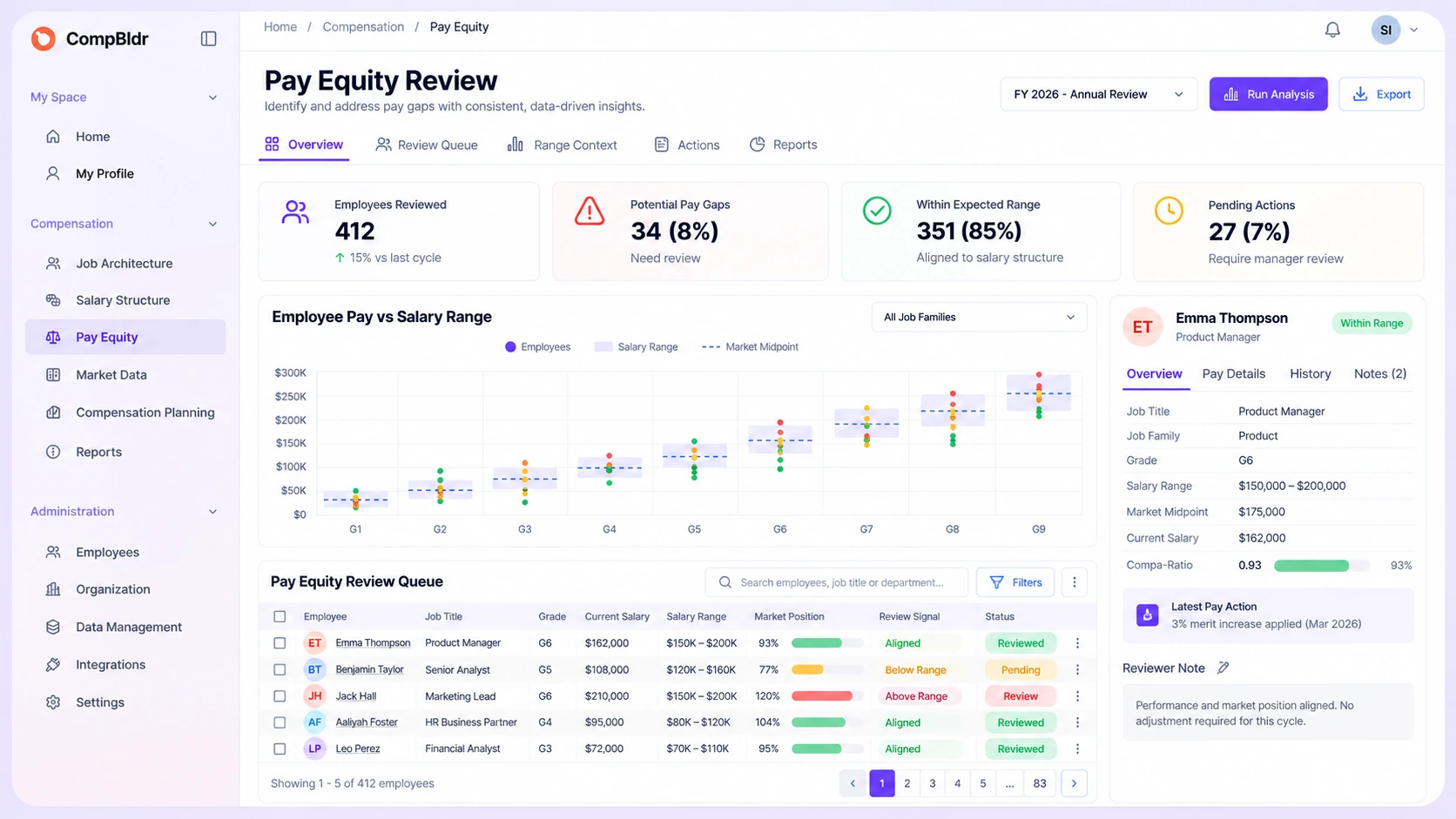
The Break Happens Between the Signal and the Pay Decision
A dashboard can surface a record that deserves review. The operational problem begins when the team has to leave that view, find the employee's job and range context, reconstruct the market evidence, open a separate planning file, and later rebuild the decision history for reporting.
CompBldr is designed to keep that compensation decision chain connected.
.svg)
The Signal Is Detached From the Job Record
Reviewers lose time when the employee's role, level, grade, and evaluated job context sit outside the analytics workflow.
If the job record and the recruiting record are drifting apart, use the job description vs. job posting pay-equity guide to check where role definition and published hiring information separate.

Range and Market Context Has to Be Rebuilt
A pay-position question becomes a manual reconciliation exercise when salary ranges, benchmarks, and market position live in separate files or tools.
.svg)
The Correction Moves Into Another Process
Once the team decides a compensation action should be considered, budgets, proposals, approvals, and rationale often move into a separate planning workflow.

The Final Record Loses the Original Context
Leadership may see the approved outcome without the governed records, reviewer context, and decision history that explain how the team got there.
Keep the Pay-Equity Review Inside the Compensation Workflow
Start From a Governed Compensation Population
Review employee pay in the context of the job, level, grade, salary range, and other structured compensation records already used by your team.
Open the Review Queue in Compensation Analytics
Use available pay-equity views, compa-ratio distribution, range adherence, outlier review, pay-versus-range context, and pay-action context to identify records that need attention. For formal review methodology, use the pay equity audit process.
Trace the Signal Back to Supporting Records
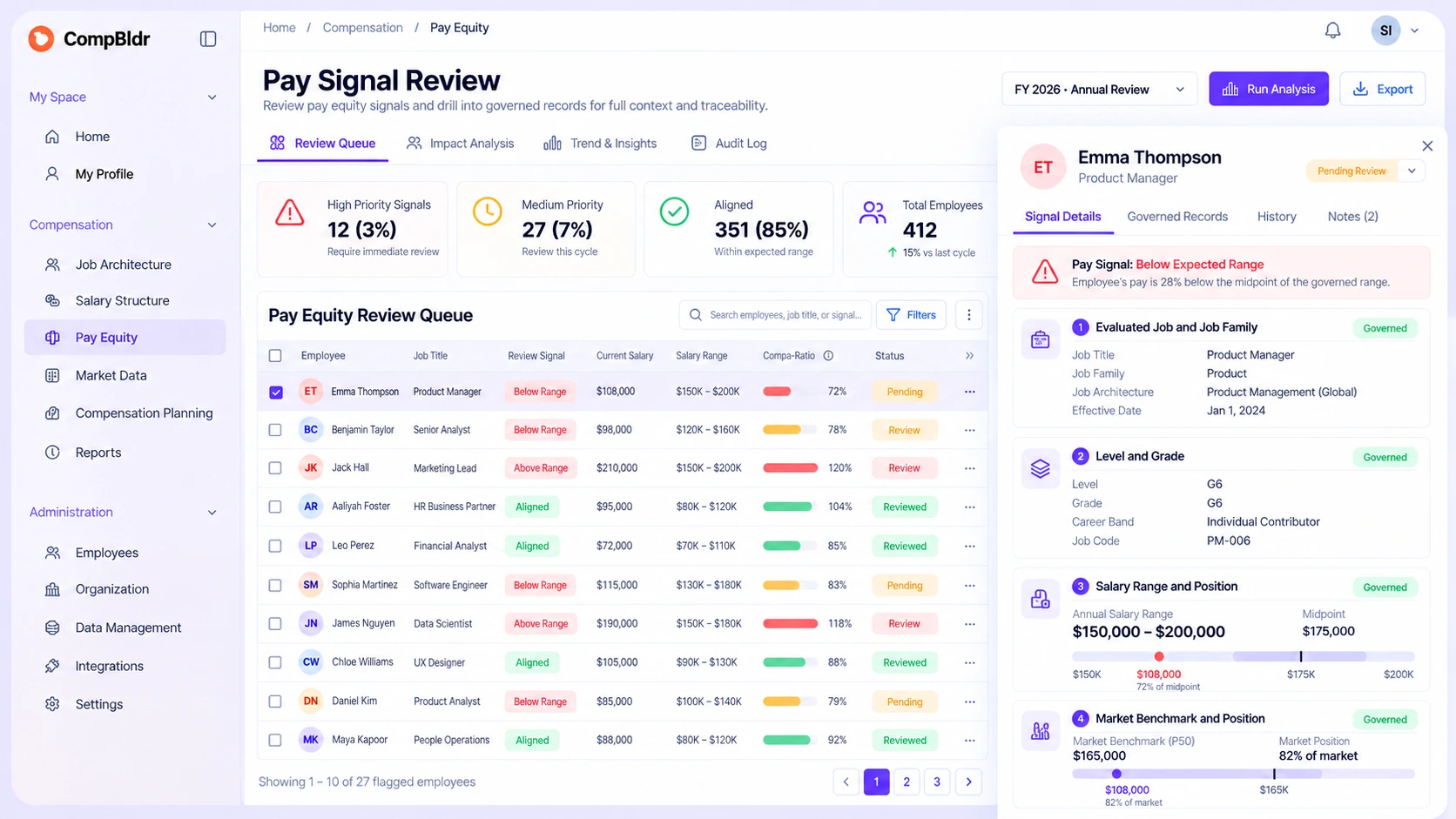
Inspect the governed job, grade, range, benchmark, market-position, and recent compensation-action context behind the record instead of rebuilding that evidence after export.
Route an Approved Action Into Compensation Planning
When your review process supports a compensation action, bring it into the planning workflow with current pay context, budgets, proposals, reviewer rationale, and approvals.
Preserve the Outcome in a Versioned Record
Keep the approved decision connected to decision history and structured reporting so the output can be reviewed later without recreating the original workflow.
What CompBldr Adds to a Pay-Equity Workflow
The product value is not another definition, formula, or audit checklist. It is the ability to move from a review signal to governed compensation evidence and, when appropriate, into the pay-decision workflow without losing context.Teams comparing platforms can use the Pay Equity Software Evaluation guide to compare workflow capabilities without confusing product evaluation with formal audit or statistical-review requirements.
Drill From a Pay Signal to Governed Records
Review employee pay alongside the compensation structure used to manage the role.
.svg)
The product helps reviewers trace the record. It does not turn a visual difference into an automatic legal or statistical conclusion. For the underlying range-position methodology, see compa-ratio vs. range penetration.
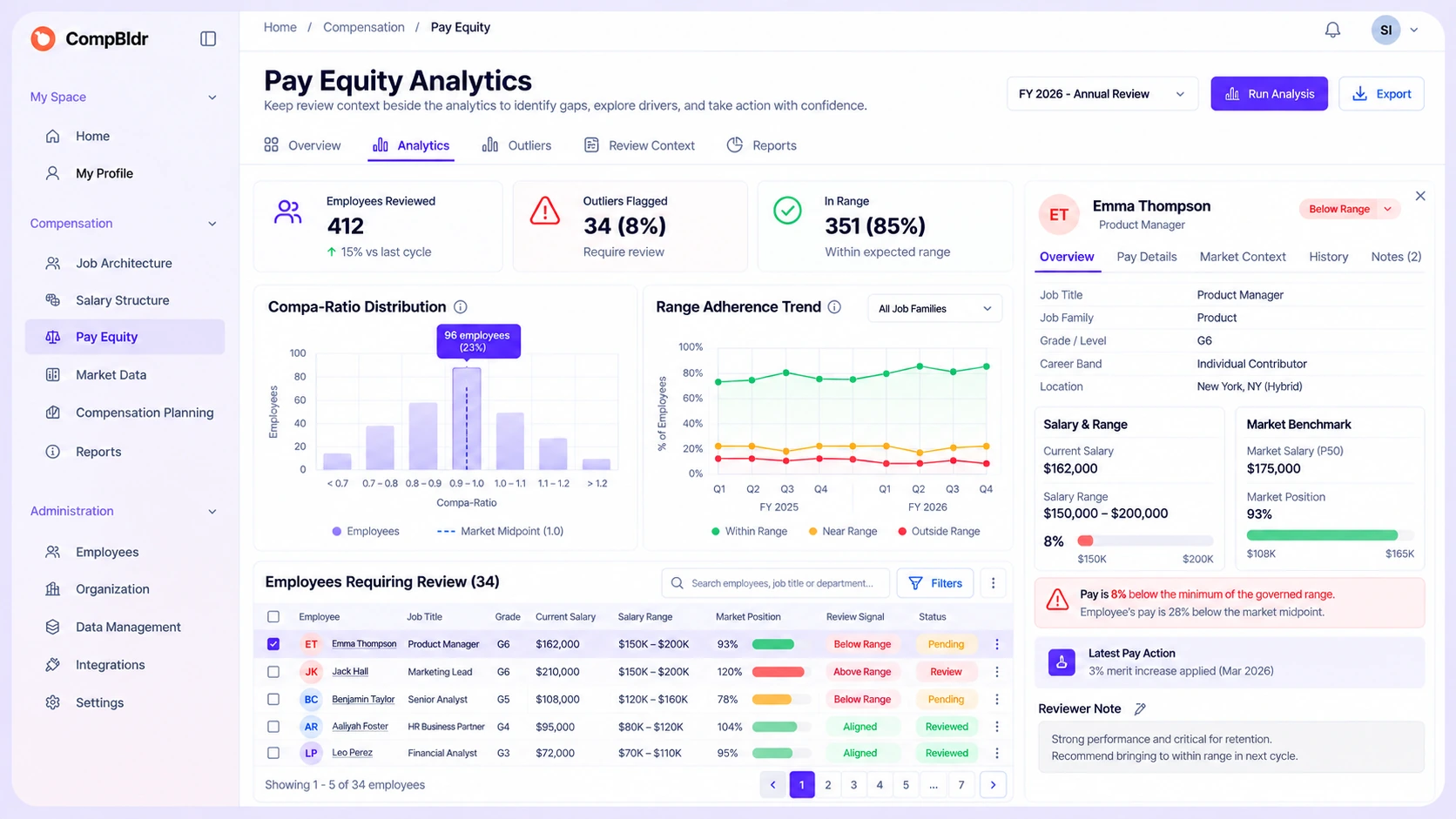
Keep Review Context Beside the Analytics
CompBldr's verified pay-equity analytics use cases include pay-equity dashboard or analysis, compa-ratio distribution, range adherence, outlier review, employee pay-versus-range context, pay-action context, and versioned pay-equity reporting.
Use those views to organize internal review and focus attention on records that need a closer look while people remain responsible for interpretation and final decisions. For statistical methodology, see the guide to adjusted vs. unadjusted pay gaps.
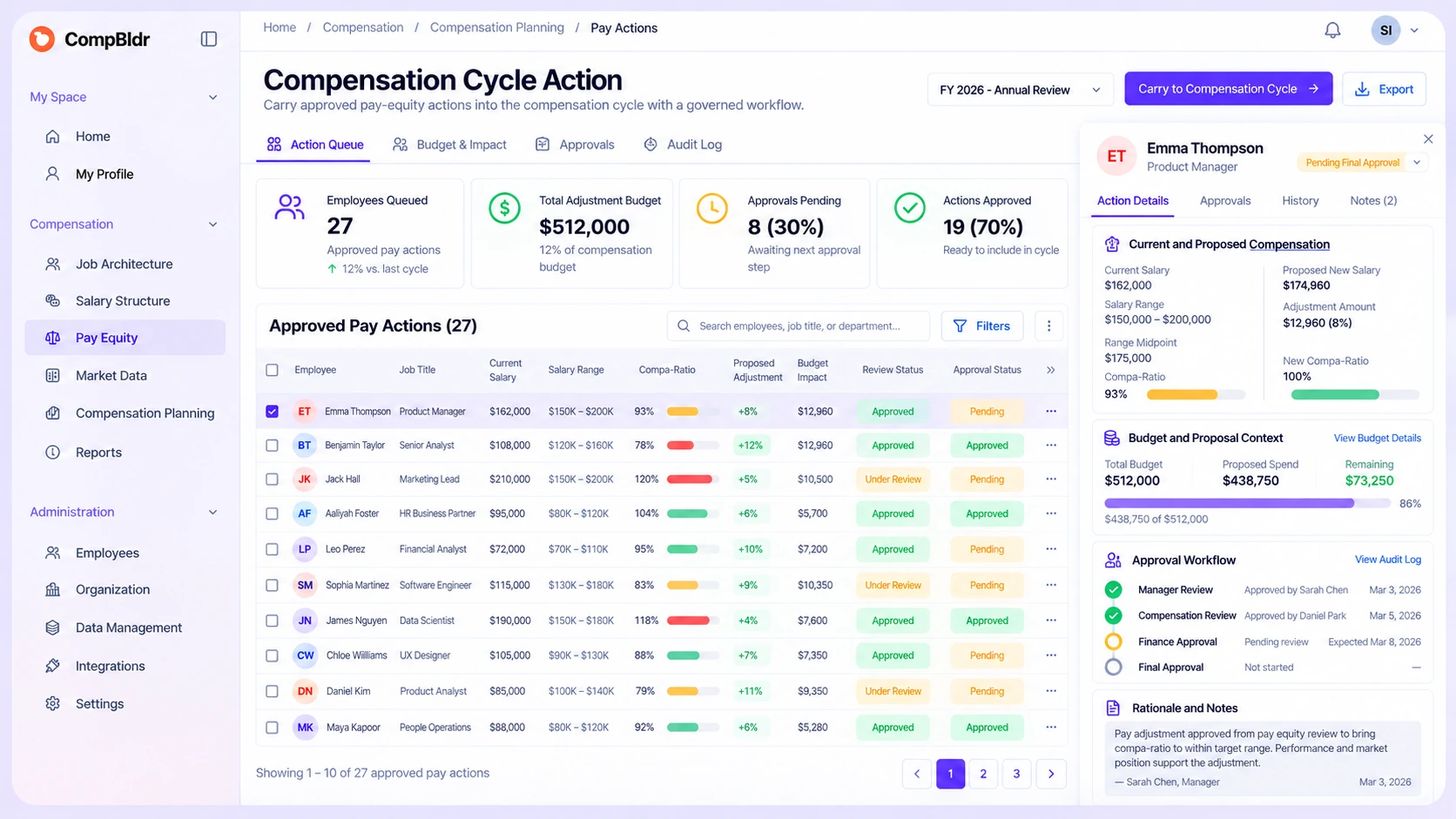
Carry an Approved Pay Action Into the Compensation Cycle
When your review process supports an action, keep the decision connected to the workflow that executes it.
That continuity is what turns an isolated analytics view into a governed compensation process.
Operate the Handoff Without
Losing the Evidence
The important product moment is not simply finding a signal. It is keeping the evidence, decision, and approved compensation action connected as the workflow moves forward. For reviewed findings that need leadership reporting, carry the reviewed evidence into a versioned leadership record without treating a dashboard signal as a legal conclusion.
Flag for Review
Use compensation analytics to surface a record or pattern that deserves attention and keep the review tied to structured employee and compensation records. For AI-specific pattern and exception review, keep TrAI as an assistive review layer while people remain responsible for final compensation decisions.
Validate Against Governed Evidence
Review the relevant job, grade, range, market, and pay-action records using your organization's approved methodology. CompBldr supports the review; qualified human analysis determines what the evidence means.
Execute the Approved Pay Action
Move the approved action into planning, budget review, proposals, approvals, decision history, and reporting without starting a separate spreadsheet process.
One Pay-Equity Solution, Powered by
the Compensation System Around It
For teams evaluating compensation equity software, the differentiator is not a longer feature list. It is whether the equity review stays connected to the records and workflows that govern compensation before and after the analysis.
.svg)
Job Architecture
Job Evaluation
Market Benchmarking

Compensation Planning

Compensation Analytics

Compensation Reporting
Frequently Asked Questions

This page explains what the CompBldr solution does and how the product connects pay-equity review to governed compensation records, planning, approvals, and reporting. The Pay Equity Software Evaluation guide is for buyers comparing platforms, capabilities, audit support, monitoring, and evaluation criteria.

Compensation Analytics is the active review surface. The broader pay equity solution connects that review to Job Architecture, Job Evaluation, Market Benchmarking, Compensation Planning, approvals, decision history, and Compensation Reporting so the team can follow the record before and after the analytics view.
No. CompBldr supports internal compensation review and the governed workflow around pay decisions. Formal legal conclusions, discrimination determinations, regression methodology, or audit opinions require the appropriate qualified review. For methodology, use the Pay Equity Audit guide.
Yes. When your review process supports a compensation action, CompBldr can keep that action connected to current pay and band context, budgets, proposals, approval routing, rationale, and decision history in Compensation Planning.
Verified product positioning includes pay-equity dashboard or analysis, compa-ratio distribution, range adherence, outlier review, gender-related views, employee pay-versus-range context, pay-action context, and versioned pay-equity reporting, connected to broader governed compensation records.
TrAI should be treated as an assistive review layer for pattern and exception signals while people remain responsible for final compensation decisions. It should not be presented as making autonomous pay decisions, guaranteeing bias removal, or making legal pay-equity determinations. See the dedicated TrAI pay-equity guide for the AI-specific topic.
Yes. CompBldr can preserve versioned pay-equity reporting alongside the governed compensation records and decision history behind the review. For a deeper reporting framework, see quarterly pay equity reporting.
See How CompBldr Keeps Pay-Equity Review Connected to the Pay Decision
Follow a review signal from Compensation Analytics to the governed job, range, and market records behind it—then into planning, approval, decision history, and versioned reporting.
No credit card · 15-minute walkthrough · Most teams invest $25K–$120K/yr


.svg)

.svg)
.svg)

