

.svg)





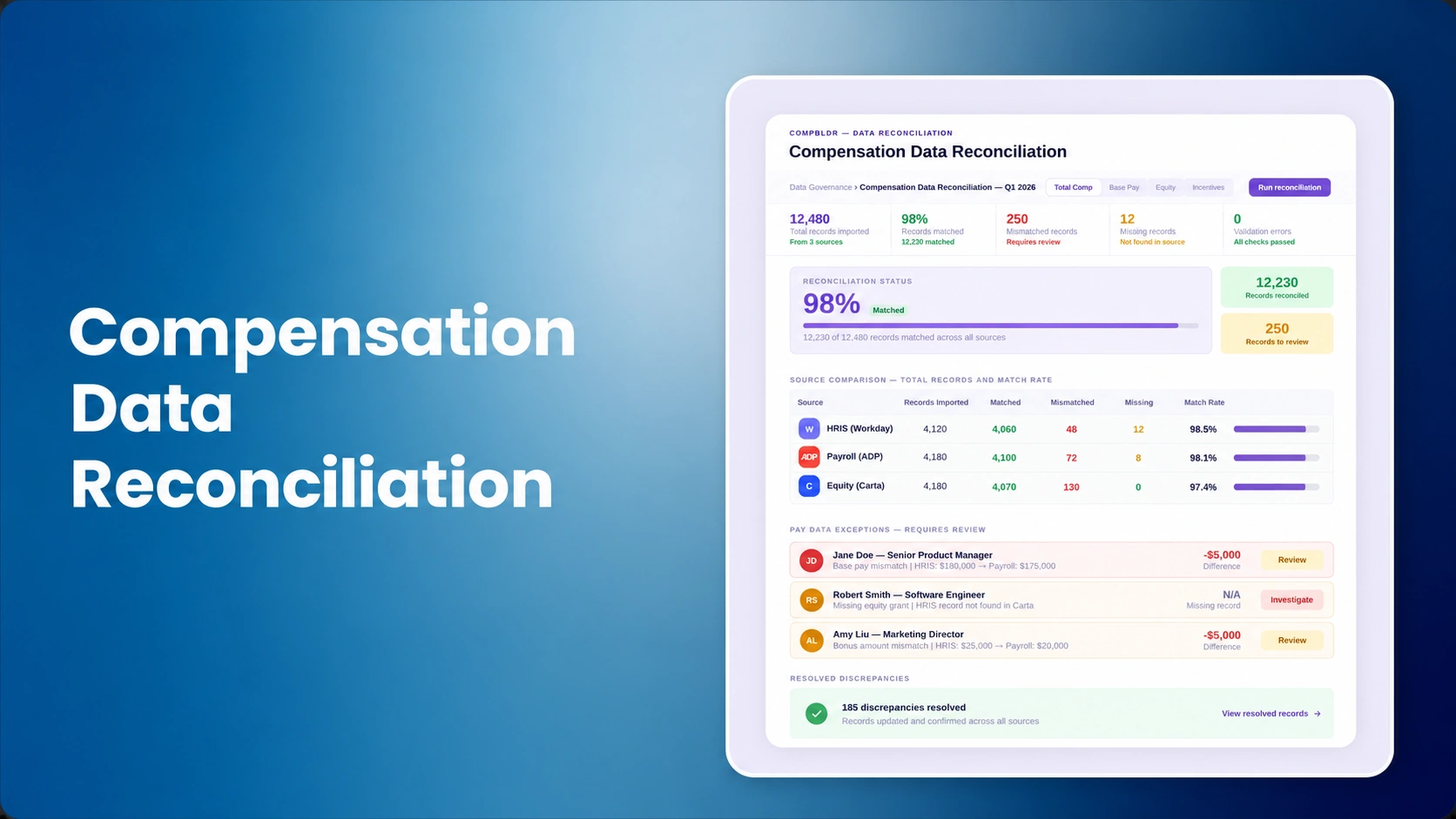

A compensation cycle can have perfect formulas and still produce wrong decisions if the inputs disagree. HRIS says the employee is P3. The job architecture says P4. Payroll shows the newest salary, but the planning file contains last month's amount. Recruiting uses the new range, while the compensation worksheet still uses the old one. None of those errors is dramatic by itself. Together, they make the cycle difficult to trust.
Compensation data reconciliation is the controlled process of comparing records across HRIS, payroll, job architecture, salary structures, market data, performance, and planning before managers make pay decisions. It is different from integration. Integration moves data. Reconciliation proves that the data agrees, or creates an exception when it does not.
Pave's 2026 data-readiness framework makes a similar distinction between cleanup and ongoing governance: compensation data needs defined owners, change protocols, validation rules, refresh cadences, and audit trails. That discipline should be applied before every material pay cycle.
Define the Source of Truth Before You Compare Anything
Reconciliation fails when teams compare systems without deciding which one is authoritative for each field. Employee status may belong to the HRIS. Paid salary may belong to payroll. Job family and level may be governed through Job Architecture. Market benchmarks may be managed in Market Benchmarking. Approved range structures may be owned by Compensation.
The goal is not to make one system the owner of every field. It is to define one authoritative owner for each data domain and one path for downstream copies.
Field-Level Reconciliation Matrix
| Field | Likely authoritative source | Common mismatch | Cycle risk |
|---|---|---|---|
| Employee ID / employment status | HRIS | Terminated or leave employee remains eligible | Incorrect population and budget |
| Current base salary | Payroll or HRIS, according to policy | Recent adjustment missing from planning data | Wrong increase amount and range position |
| Job code / family / level | Governed job architecture | HRIS contains old title or level | Wrong range, benchmark, eligibility, or guideline |
| Salary range version | Compensation structure record | Planning tool uses superseded midpoint | Incorrect compa-ratio and manager guidance |
| Manager / org hierarchy | HRIS | Employee appears under former manager | Wrong access and approval routing |
| Performance input | Performance system | Draft or stale rating flows into planning | Incorrect guideline where policy uses performance |
| Approved prior action | Compensation decision history | Promotion or market adjustment not reflected everywhere | Duplicate or conflicting increase |
Reconcile Identity Before Compensation Logic
Start with population integrity. Confirm one employee record per eligible person, stable employee IDs, current status, manager, location, entity, and currency. Duplicate names should never be the join key.
If the employee population is wrong, every later control becomes unreliable. Budget totals can still add up while the wrong people receive recommendations.
Use the planning software versus spreadsheets framework as a reminder that a clean employee snapshot is the beginning of the cycle, not a clerical step after configuration.
Reconcile Job Architecture Before Salary Ranges
A salary range is only meaningful if the employee is attached to the correct job and level. Compare HRIS job codes and titles against the governed job leveling framework.
Where a mismatch reflects a real job change, use Job Evaluation or the job leveling matrix rather than silently updating the level to make the range fit.
The job grades versus job levels distinction matters because a wrong level can cascade into a wrong grade, range, market match, and guideline.
Reconcile the Inputs Before Managers See the Cycle
Use CompBldr integrations and compensation workflows to keep employee, job, range, and approved-pay data connected to the systems that own each record.
Reconcile Salary Range Version and Effective Date
Compensation teams often verify that a range exists but not that the correct version is active. A mid-year range update can leave the HRIS, ATS, and planning system on different values.
Use the salary range definition, salary-band methodology, and current version-control policy to confirm the minimum, midpoint, maximum, geography, currency, and effective date that apply to each employee.
Once the correct midpoint is confirmed, compa-ratio becomes meaningful. If the midpoint is wrong, the metric is mathematically correct and operationally misleading.
Reconcile Market Evidence Separately From Employee Data
Market benchmarks change at a different cadence from employee records. The market pricing methodology should preserve source, job match, geography, pay element, and effective date. The benchmarking evaluation guide can help identify weak or conflicting evidence.
Do not automatically replace a salary range because a new market value appears. Market data informs structure. The approved range is an organizational decision with its own effective date.
Set Reconciliation Tolerances Instead of Treating Every Difference the Same
Some differences are errors. Others are expected timing differences. Build explicit tolerance and escalation rules.
| Mismatch | Severity | Action before cycle | Owner |
|---|---|---|---|
| Employee salary differs between HRIS and payroll | Critical | Stop employee from planning until authoritative value is confirmed | HRIS / Payroll + Compensation |
| Job title text differs but governed job code matches | Review | Confirm display-title policy; may not block cycle | HR / Job Architecture |
| Range midpoint differs across systems | Critical | Confirm active version and republish correct values | Compensation |
| Manager changed after snapshot date | Policy dependent | Apply cycle ownership rule and update access if required | HRIS + Compensation Operations |
| Performance rating is still draft | Critical where rating drives guidance | Hold guideline calculation until final status | Performance owner |
| Prior market adjustment is approved but not yet in payroll | Critical | Prevent duplicate recommendation and reconcile effective date | Compensation + Payroll |
Build an Exception Queue, Not a Cleanup Spreadsheet
Every mismatch should have an owner, status, root cause, resolution, and completion date. Reconciliation is not complete because someone highlighted cells yellow.
Separate exceptions into categories such as employee identity, job structure, salary, range, manager hierarchy, performance, prior compensation action, and integration timing. That makes repeated failure patterns visible.
If the same field fails every cycle, fix the upstream ownership or integration rather than adding a permanent manual check.
Run Reconciliation at Three Points, Not Once
Before configuration
Clean the source population, jobs, ranges, and core policy inputs before the planning tool is configured.
At cycle freeze
Reconcile the exact snapshot managers will see. Record the snapshot date and rules for later employee changes.
Before payroll export
Compare final approved decisions to the current employee record, payroll input, and original approval. This catches late transfers, terminations, salary changes, or duplicate actions.
Integrations Reduce Re-entry, but They Do Not Eliminate Reconciliation
CompBldr's Integrations page describes data exchange with Workday, Oracle HCM, SAP SuccessFactors, ADP, BambooHR, and other systems. The Workday integration article explains how employee and job data can flow into compensation work and approved grade or range outputs can move back.
The real-time integrations article highlights the risk of stale employee records. Even with automated synchronization, Compensation still needs validation rules because a perfectly synchronized wrong source value is still wrong.
Reconcile Budget and Employee Outcomes Together
A cycle can reconcile employee-level data and still have a budget issue. Use Compensation Planning to compare eligible headcount, budget allocations, manager recommendations, exceptions, and final approved spend.
Use Compensation Analytics to identify employees outside ranges, unexpected distribution shifts, or pay compression created by the final decisions.
The compensation dashboard metrics article can help Finance and HR monitor the cycle after the data gate passes.
Illustrative Example: One Promotion, Three Systems, Two Risks
The following scenario is illustrative and uses hypothetical values or events to show the decision process.
Assume an employee was promoted from P3 to P4 effective September 15. HRIS already shows P4. Payroll still reflects the old salary because the increase is effective next payroll. The compensation planning snapshot was created September 10 and still shows P3 with the old range.
If the October planning process ignores reconciliation, the manager may recommend another increase against the old P3 midpoint. The employee could receive a duplicate action and the budget could be overstated.
The correct resolution is not to pick whichever system looks newest. Confirm the approved promotion, effective date, new salary, destination range, and payroll execution status. Then decide whether the employee is eligible for the new cycle under policy.
Failure Signals
- Teams join files on employee name instead of stable ID.
- No one can state which system owns job level or salary range.
- Range mismatches are corrected manually without fixing the upstream source.
- Cycle eligibility is calculated before current status is reconciled.
- Approved off-cycle actions are not included in the next snapshot.
- Payroll export is treated as a technical handoff rather than a final control point.
Illustrative Example: The Cycle Snapshot Is Clean Until a Late Promotion Arrives
The following scenario is illustrative and uses hypothetical values or events to show the decision process.
Assume the compensation cycle snapshot is created on October 1. On October 3, an employee receives a promotion effective October 1, including a new P4 job code, salary, and range. The HRIS is updated immediately, but the planning snapshot still shows the old P3 record.
If managers begin planning on October 5 without reconciliation, the employee can receive a merit recommendation against the wrong range and salary. The error is not caused by a bad formula. It is caused by a timing mismatch between an approved compensation action and the cycle population.
A reconciliation rule should identify employees changed after the snapshot date, compare those changes with cycle eligibility policy, and either refresh the record or create an exception before the manager can act.
Turn Reconciliation Results Into Upstream Improvements
Do not measure success only by the number of mismatches fixed before launch. Track where mismatches originate. If job codes repeatedly disagree, clarify job-data ownership. If salary differs every cycle, review payroll-to-HRIS timing. If managers are wrong after reorganizations, improve hierarchy refresh logic.
A useful monthly or quarterly review can group exceptions by field, source system, root cause, severity, and recurrence. That turns reconciliation from recurring cleanup into a data-quality program.
What Changes by Operating Model?
Smaller organizations may reconcile a smaller number of systems but rely more heavily on manual work, making ownership clarity especially important. Mid-sized teams often need reusable validation rules and controlled exception queues. Large enterprises need reconciliation by entity, country, currency, and integration path, with local issues rolled into a global control framework.
Regardless of scale, critical differences should block the affected employee from progressing until the authoritative value is confirmed. A warning that everyone ignores is not a control.
Catch Compensation Data Mismatches Before They Become Pay Decisions
See how CompBldr connects HRIS, job architecture, salary ranges, planning, analytics, and reporting so teams can reconcile the compensation decision chain before a cycle opens.
Book a Demo


.svg)

.svg)
.svg)

